This page provides an overview of the process for the Maker to follow in order to administer pricing and trading on Bloomberg.
With the appropriate Bloomberg-defined “Price classes” and Maker-defined configuration deployed in Bloomberg (Spread and Credit buckets, Profles, Trading Limits etc) their pricing engine, individual clients may be set up for ESP via the Bloomberg Trading Grid, or RFS (including Batches and Blocks), or both.
Onboarding - Maker Side
In Bloomberg, All Maker-side onboarding tasks are performed within FXPV (FX Enablement and Privileging) function.
NOTE: Client configuration for ESP lives in BLP (e.g. profile/bucket assignment) and the Maker's pricing engine (e.g. price rounding/smoothing by bucket), whilst Client configuration for RFS lives entirely in the Maker's pricing engine (e.g. price rounding/smoothing again).
Whilst the vast majority of the eFX configuration is the responsibility of the individual counterparties (i.e. You, the Maker and your Taker client), no ESP/Trading Grid functionality is possible without Bloomberg having setup one or more “Price Classes”, each one containing a set of currency pairs pre-agreed with the Maker.
How the Price Classes are actually applied is then the responsibility of the Maker via the Spread Bucket and Profile definitions in FXPV.
FXPV 3 – Enable Counterparties
This applies for both ESP and RFS trading models. Maker and Taker deal-codes will be delivered in the NoPartyIDs block with PartyRole = OrderOriginationFirm or ExecutingFirm of Whisperer QuoteRequest & NewOrderMultileg messages.
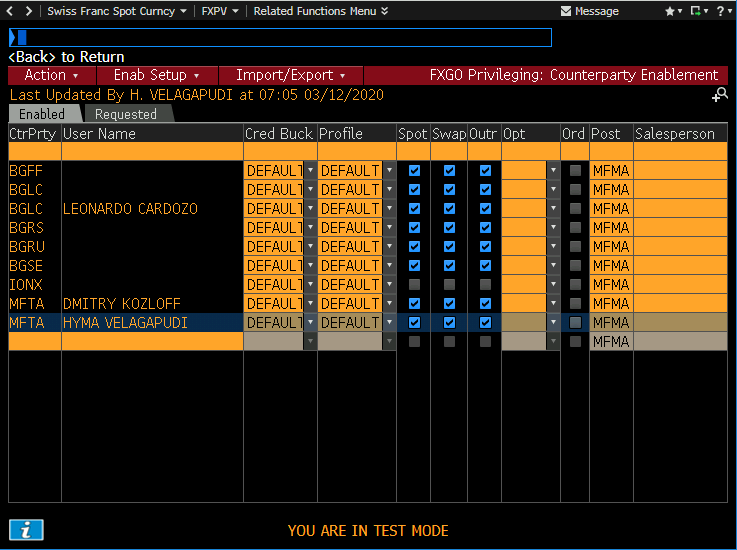
Select the counterparty/user specified in the email or listed in the “Requested” tab and click Acct Enab (Account Enablement):
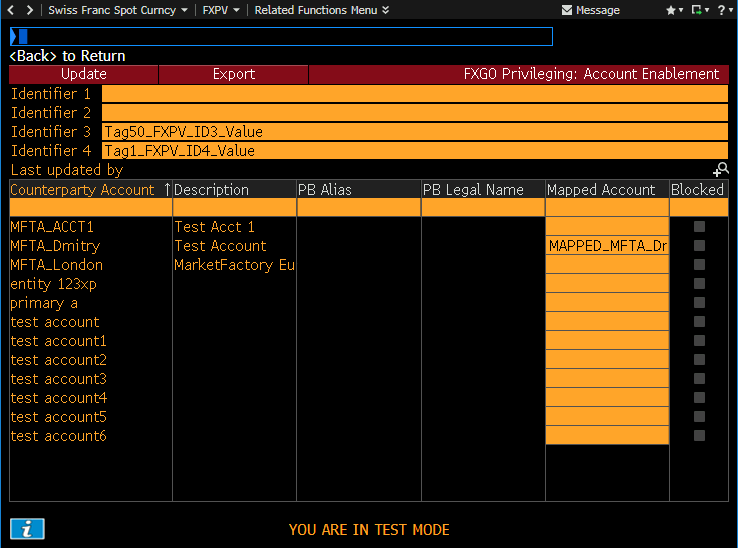
The "Mapped Account" column should be used to specify the internal Maker ID to be associated with the client account. If populated, this will be sent in the LegAllocAccount field of Whisperer QuoteRequest & NewOrderMultileg messages. Otherwise the unmapped client account name will be used, prefixed by Bloomberg with "*".
Identifier 3 - Maps to tag 50/SenderSubID (QuoteRequest, NewOrderSingle) and represents a Maker-assigned name for the the overall Client Firm (i.e. a synonym for the deal-code). Whisperer delivers the field value with BodyPassthroughKey = FXPVID3.
Identifier 4 - Mapped by Bloomberg to the Account (and thus delivered in the Whisperer LegAllocAccount) in situations where either no allocation is provided (i.e.this can be considered the default account), or when multiple allocations are provided. In this latter scenario Whisperer delivers the field value with BodyPassthroughKey = FXPVID4.
Pricing Configuration
FXPV 1 – Enable Traders
The Maker needs to ensure that the user they have created for their Pricing Engine is listed here, and named appropriately.
NOTE: Pre-existing sales users associated with the Maker's deal code may also be listed here.
NOTE: The Pricing Engine user should be listed as the "primary user", as this user will receive the email confirmations in Bloomberg for all completed eFX deals.
FXPV 2 – Enable Sibling Traders
Bloomberg introduced the “sibling” concept in order to address the scenario where admins of one deal code within a firm require to access other deal code settings or blotters. This function allows any sibling in the group to permit other siblings for various functionality (but NOT trading) on their deal code.
FXPV 5 – Setup Spread Buckets
For a given currency pair, at least one defined Spread Bucket must be associated with a Profile in order for a client to be permissioned for that pair in the Trading Grid.
Multiple Spread Buckets may be defined for a given pair – thus multiple profiles can be defined, each using a different Spread Bucket for the currency pair, in order to achieve different pricing/dealing effects.
NOTE: at least one Spot Tier must be defined for the Spread Bucket if tradeable prices are to be shown. No tiers for Spread Bucket = INDICATIVE.
NOTE: Rate Precision (the decimal places) is constrained by the fact that in total the rate can be a maximum of six significant figures (RFS can support more).
FXPV 6 – Setup Credit Buckets
As a minimum, a catch-all credit bucket definition is required in order for the currency pair to be available on the client’s Trading Grid:
FXPV 7 – Setup Profiles
An individual profile determines which Spread Bucket (if any) should be used for a given currency pair. As mentioned previously, this links the pair back to a particular Price Class.
If a particular currency pair is not included in the profile, it will not be available to a client in their ESP Trading Grid.
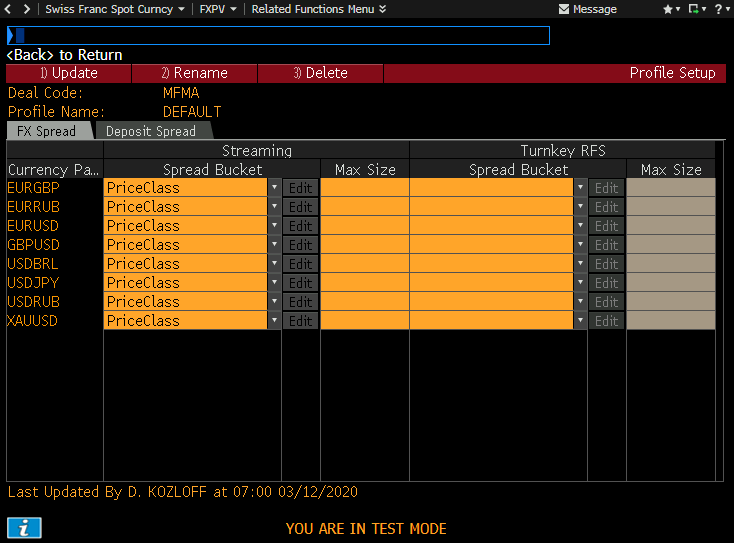
For most Makers, it is expected that multiple profiles need to be defined.
NOTE: “Turnkey RFS” represents setup required in order to offer an RFS price via Bloomberg's blended rates, this is generally not relevant.
NOTE: The Bloomberg PriceClass name is delivered by Whisperer in the ESP QuoteRequest SecurityGroup field.
FXPV 8 – Panic Modes
Allows the application of AutoEx or Manual Trading panics.
FXPV 10 – Market Modes
A simple radio button selection Normal/Fast/Very Fast, where the latter two apply an additional fixed spread.
FXPV 12 – Precision Setup
This is used to fine-tune manual pricing (which is where RFQs will go in the event that the Maker pricing engine should reject a request).
FXPV 17 –Custom Trade Notes
Used by Takers to define additional fields (e.g. SIs) to be displayed on their RFS screen. These fields will not be passed through the FIXBook Quoting/Dealing API, but they will be available to the Maker within Bloomberg.
Onboarding - Taker Side
Client onboarding is generally initiated by the Taker client via the FXRE (“FX Go Request Enablement”) function:
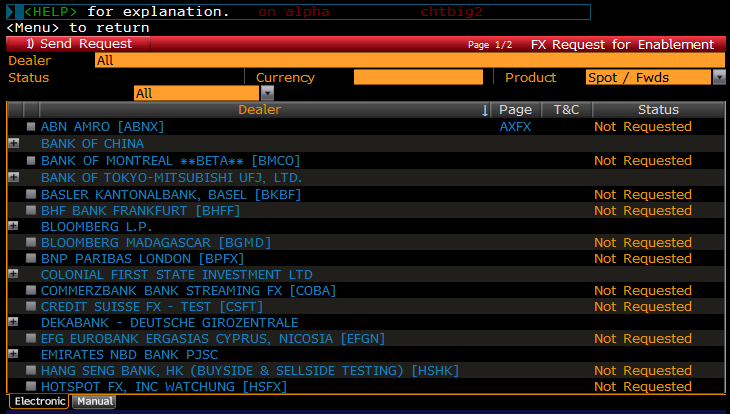
Once an Electronic Spot/Fwd enablement request has been made, the selected provider(s) will receive an email, allowing them to onboard or decline the request in FXPV. The counterparty will also be listed in the “Requested” tab of the FXPV Enable Counterparties function.
Of course, as an alternative to the request-based model, the client may be onboarded unilaterally by the Maker if you wish.
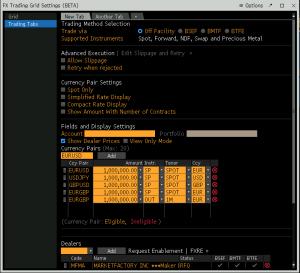
Assuming that the client is onboarded by the Maker, they will then see the Maker listed as one of their streaming counterparties when they open the “Ccy Settings” window from their Trading Grid. From here they can select you for whichever ccy’s you offer that they require:
Client Account setup
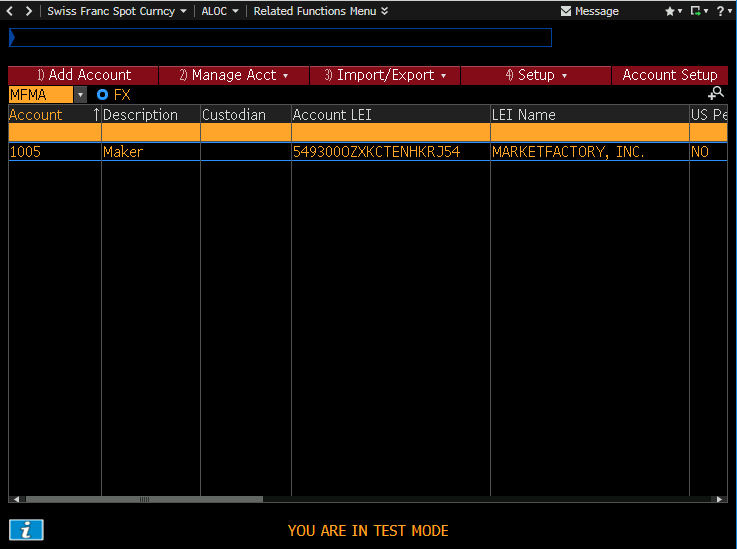
The taker counterparty will administer their trading accounts via the ALOC (“Account Setup”) function, after which they will see the account listed in the various Launchpad RFQ windows and in the Trading Grid Account drop-down.
FXGO Preferences
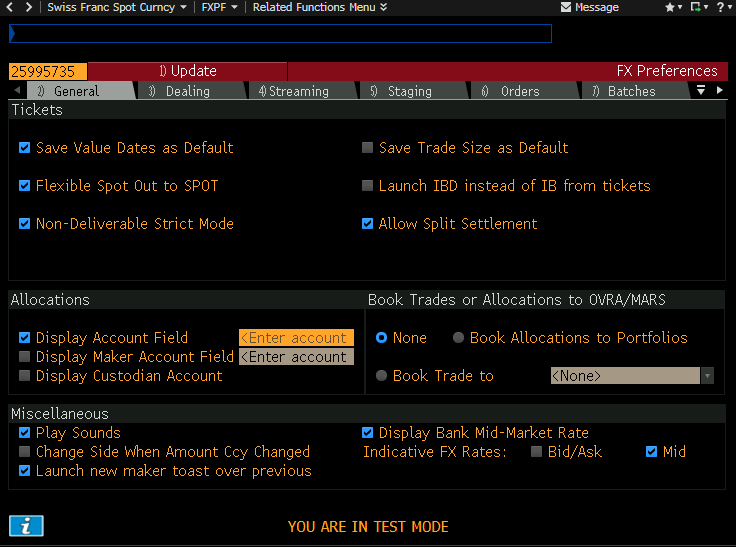
The Client may enable 1-click RFS trading (this is essential if they are to have a positive trading experience with the Maker) by selecting: Dealing > RFQ > 1-click trading.
Overview
Content Tools