The MFAPI does not start a background thread to process events from the socket connection. This is done specifically so that the Customer Application has complete control over its resources. This means that the Customer Application must explicitly call the run() function/method to perform the required event loop processing. (The terms "function" and "method" are synonymous).
The run() method processes incoming messages and dispatches them to the Customer Application's MFHandler interface implementation; it is important to note that the run() method will block indefinitely as it waits for new incoming messages.
There are four scenarios in which the Client Application can return from the run() method
(immediately before which we fire the onStop() callback for cases 2, 3, 4):
1. The MFAPI does not successfully start dispatching.
2. The Customer Application makes a request to stop event processing (possibly from a separate thread.) This prompts the callback MFHandler.onStop() and then returns APIResult.OK.
3. An internal error occurs during dispatch. Prior to returning, the connection to Whisperer will be terminated. This prompts the callback MFHandler.onDisconnect() followed by either MFHandler.onConnect() or MFHandler.onStop().
4. The Customer Application's MFHandler callback throws an exception, which is then rethrown by run().Main Thread MFHandler MFClient
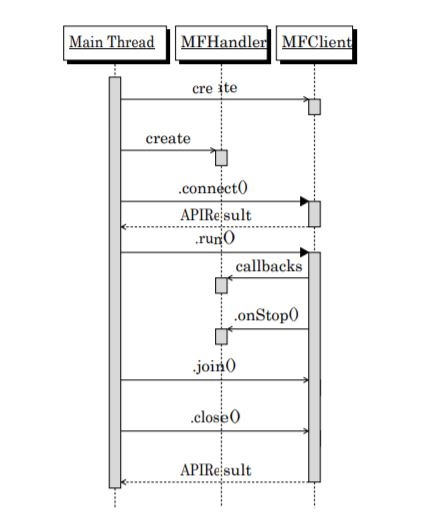
Figure 8.2. – Connection lifecycle showing clean disconnection from Whisperer
Dispatch processing can be done in the main thread or in a separate thread. This depends on the design of the Customer Application. If there are multiple MFClient instances, and thus multiple connections to the Whisperer, each MFClient should be dispatched from separate threads to avoid processing delays.
If the MFClient is not connected, calling run() returns error code APIResult::NOT_CONNECTED. This can occur if MFClient.close() is called or if the connection has been broken. The run() method can be called if the MFClient is stopped but is still connected. (For example, if the stop() method is called). The run() method is passed an implementation of the MFHandler interface, provided by the Customer Application.
The Customer Application is responsible for dispatching events in a consistent and timely manner, otherwise, data could accumulate on the socket receive buffer. If this condition persists, eventually the Whisperer server will detect the buffer filling up and disconnect the Customer Application's socket connection. The run() method will return with an error of SOCKERR_CLOSED. As described above, dispatch processing can be handled in a separate thread.
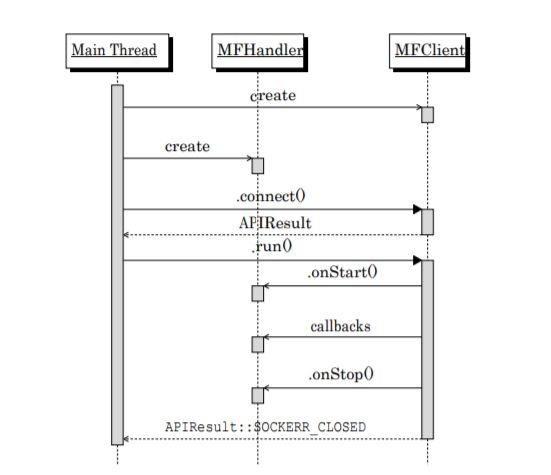
Figure 8.3. – Connection lifecycle showing disconnection from Whisperer due to network error.
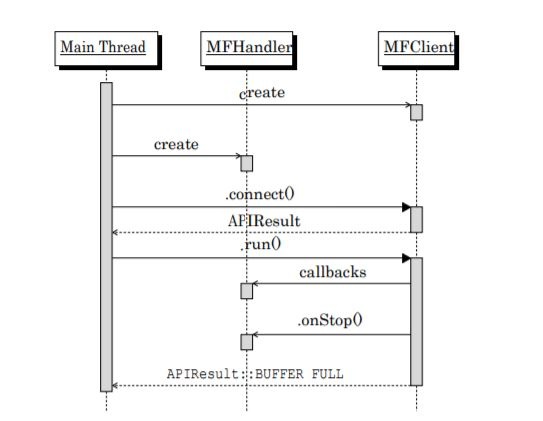
Figure 8.4. – Connection lifecycle showing disconnection from Whisperer due to slow handling of callbacks by Customer Application+Main+ Thread MFHandler
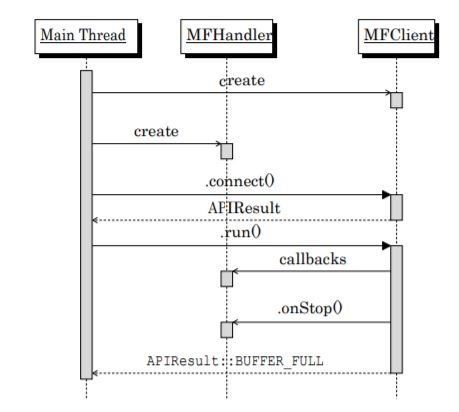
Figure 8.5. – Connection lifecycle showing disconnection from Whisperer due to the unhandled exception in handler callback.
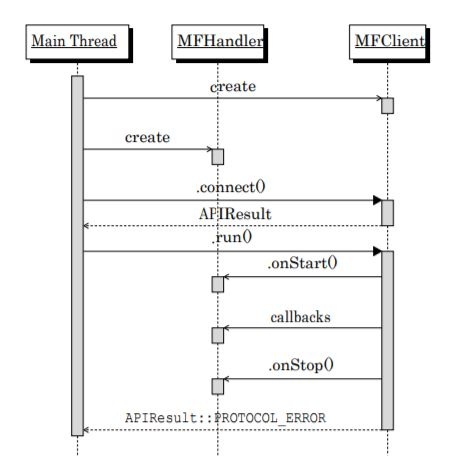
Figure 8.6. – Connection lifecycle showing disconnection from Whisperer due to client/server version mismatch.
Additional Material
Further detail is provided in the following page(s):
Overview
Content Tools