Pricing
Subscription Management
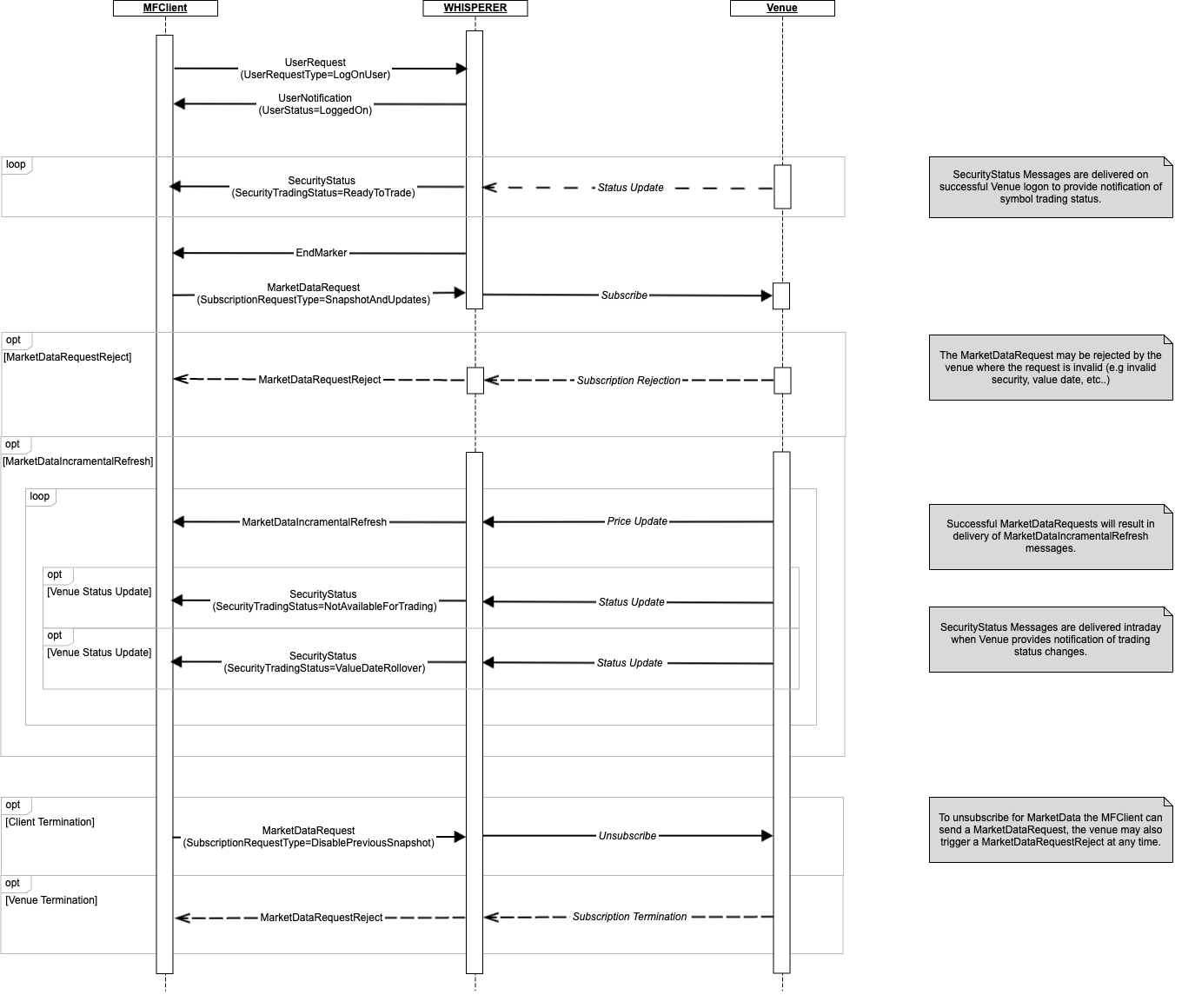
A Venue pricing Session is established with the standard UserRequest (LogOnUser) / UserNotification (LoggedOn) message exchange.
On successful connection, if available, SecurityStatus messages will be delivered to the client, providing details of the supported instruments. These messages may also be sent intra-session, to notify the Client User of events such as tradeability changes, date roll events, etc.
Aside from this, CLOB Pricing sessions are managed via MarketDataRequest messages issued by the Client User to the Venue, with streaming MarketDataIncrementalRefresh messages being delivered until such time as the request is terminated.
The basic market data sequence is outlined below:
Subscription Response
Subscription Response
The client will receive an immediate response to an invalid MarketDataRequest.
However, the client may not always receive an immediate MarketDataIncrementalRefresh in response to a valid MarketDataRequest stream subscription:
- There may be an interval of several minutes before the first
MarketDataIncrementalRefreshis received by the client. - The venue may never respond.
A Venue's response actually depends on the instrument being traded, time of day and venue-specific behaviour.
The client may wish to implement a timeout mechanism to unsubscribe and then either:
- Mark the instrument as unavailable.
- Resubscribe. Generally this is of very little value and is not recommended.
SecurityStatus Messages
SecurityStatus messages communicate static attributes of each instrument supported by the Venue and are delivered on successful connection to a CLOB Pricing session.
Should Whisperer be notified of changes for an Instrument, these messages will also be used to deliver intra-day updates. Typical scenarios are value/trade date rolls & changes in trading status (open/halted).
The usage of specific fields is elaborated below:
ContractMultiplier- This is aka Lot SIze. whilst there are a few FX venues to allow the client to trade standardised contracts (e.g. LMAX), this is primarily present for trading Futures on venues such as the CME. For most venues, the contract multiplier returned will be 1.0.MinQty- This is the minimum allowed Order size for the Venue. given that the venue may be trading in terms of contracts, the client may safely assume that this quantity is expressed in ‘nominal’ units (e.g. contracts) and not in total units.
EndMarker Messages
For CLOB Priucing sessions, EndMarkers are sent to the Client in two contexts:
- SecurityStatus
- MarketDataIncrementalRefresh
SecurityStatus EndMarkers
An EndMarker message is sent by Whisperer to mark the end of the initial set of SecurityStatus messages sent after the venue session is established. It serves as an indication to the Client that the status of all available instruments has been published.
Always Published
The EndMarker message is always published on session establishment for CLOB MarketData feeds. Where venues do not provide any initial SecurityStatus info, we will publish the EndMarker immediately.
The EndMarker message may thus be used by the Client as a reliable "ready" signal to initiate market data subscriptions.
MarketDataIncrementalRefresh EndMarkers
Venues typically publish market data in a conflated fashion (as opposed to a real-time stream of individual events), and it is important for Client systems to be able to recognise the end of each conflation interval. Where these notifications are available, they will be published in the form of EndMarker messages to the Client User, whenever any MarketDataRequest subscriptions have been established.
Under normal trading circumstances, EndMarkers may also be published for incremental refresh conflation intervals when nothing has changed. As such they have the appearance of a Venue heartbeat, but it must be remembered that they serve an entirely different purpose.
NOTE: For UDP/Multicast feeds, different EndMarkers may be published for each data channel, Incremental vs Trades Feeds for example. This is Indicated via MDBookType.
MarketData Messages
Snapshot vs Incremental Updates
Whisperer uses a single MarketDataIncrementalRefresh message for all market data updates.
The MDFlags.IsSnapshot flag is used to indicate how the message relates to the previous state:
TRUE -This message must fully replace any book that exist prior.FALSE -This message is to be applied to the local book, which must be retained.
This flag is guaranteed to be set such that the local book is always correct. In particular it should be noted that:
- On starting the subscription, the local book is regarded as empty. For the the first update the client receives, all MDEntries will specify
NoMDEntries[*].MDUpdateAction = New, so the value ofMDFlags.IsSnapshotis immaterial in this case and Whisperer may mark the first update as a snapshot, or not, depending on the venue. - Snapshots may be delivered at any time in the life of the subscription. This is particularly important for connections to UDP multicast feeds where dropped packets must trigger book/session recovery.
Incremental Processing
When MDFlags.IsSnapshot= FALSE, standard incremental processing is expected. The client must reference each NoMDEntries[*].MDUpdateAction and apply the New/Change/Delete action against the associated MDEntryID. It is essential that the NoMDEntries repeating groups are processed in the exact order given.
The population of the NoMDEntries group will vary with the MDUpdateAction as follows:
All-MDEntryIDandMDUpdateActionare always provided.Delete- by definition the entry is no longer valid, so there is no need to redeliver the state of the outdated entry.New- all other available fields will always be provided.Change- typically, only the fields that have changed will be provided.
Performance considerations
For Change events, the following principles apply:
- If the venue also delivers unchanged fields in addition to those that trigger the update, these will also be supplied.
- In the typical case where the venue only delivers the modified fields, Whisperer does re-populate the previously published fields.
Book Depth
Where clients subscribe for custom book depths against a given Venue, it is important to understand that entries that are pushed below the requested depth by more competitive orders will not necessarily result in an explicit Delete being delivered by the Venue for Whisperer to process.
Rather than pass on the responsibility for identification and processing of these implicit deletes to the Client, Whisperer will ensure that explicit Delete events are always delivered.
Book Management
Please refer to Liquidity Representation for an overview of CLOB market data structures.
OrderDepth books are characterised by there being the possibility of many orders at each Bid or Offer price point. In order to ensure that this book is maintained correctly the Client must order it first by Price (best to worst), and then by Age (oldest orders first) for each given price.
PriceDepth books are a simplification of this since we know that they are an aggregated view of the raw OrderDepth data, so there is only ever a single entry for any given Bid or Offer price point. The same applies for other aggregated views - Spread, VWAP etc.
The MDEntryID is always used as follows for the two book types:
- OrderDepth - MDEntryID provides a unique identifier of that individual Order, as and when the order is modified it's ID will change. Additional linkage information may also be provided by the venue so the market data consumer can track each individual order through it's entire lifetime. Whisperer currently delivers this in the NoEntryPassthruFields block, if available.
- PriceDepth - here the MDEntryID represents a specific side/price level and so could be used to give the correct book ordering. Typically it will be a string representation of either the price itself, or the level within the book (position number).
MDEntryID Uniqueness
The MDEntryID is guaranteed to be unique through the MDUpdateAction lifecycle for the parent subscription only:
- Previously deleted IDs may be re-used in the lifetime of the subscription.
- Previously used IDs may be used across subscriptions and sessions.
In order to ensure a consistent processing model across both book types, the client may implement an efficient equivalent of the following:
- Process the individual updates contained within the market data message.
- Collect the orders by price level. This is redundant for a PriceDepth book, which is already aggregated.
- Sort prices for each side of the book best to worst. I.e. The Client always sorts the book by price for each side (not MDEntryID).
- For each price level at or above the subscribed MDBookDepth, sort MDEntryIDs smallest (oldest) > largest (newest). Again, this is redundant for a PriceDepth book, which is already aggregated. I.e. the MDEntryID is a secondary key for OrderDepth books, to sort multiple orders at a give price level.
The presence of any entries outside the subscribed MDBookDepth is unintended behaviour.
Book Integrity
When processing a Whisperer MarketDataIncrementalRefresh message, Whisperer ensures the overall integrity of the book at the end of the NoMDEntries cycle. During the cycle:
- Whisperer ensures that books will never exceed any specific requested depth - when implicit deletes are detected, the explicit Delete MDEntry is placed before the New that triggers it.
- Two MDEntries in a PriceDepth book may momentarily have the same price - this typically occurs when multiple MDEntries on one side of the book change their prices up or down, such that the first MDEntry moves to a price level occupied by a different MDEntry that has yet to have it's price modified.
UDP/Multicast MarketData Feeds
As well as the EndMarker behaviour outlined above, the client needs to be aware of the following unique attributes of UDP Market Data feeds:
- Line Arbitrage - the MDSubFeedType specifies the UDP market data source for venues which utilise A/B circuits.
- Gap Detection - in the event that a UDP message gap occurs, this is reported to the Client User immediately it is detected for each affected subscription, via the publication of a EmptyBook
MarketDatIncrementalRefreshmessage withMDFlags.IsSnapshotandMDFlags.GapDetectedboth set to TRUE. - Gap Recovery - the gap will be resolved by the Gateway utilising the venue's standard Late-joiner logic, and the next message will be a fresh Snapshot representing the full book.
Orders
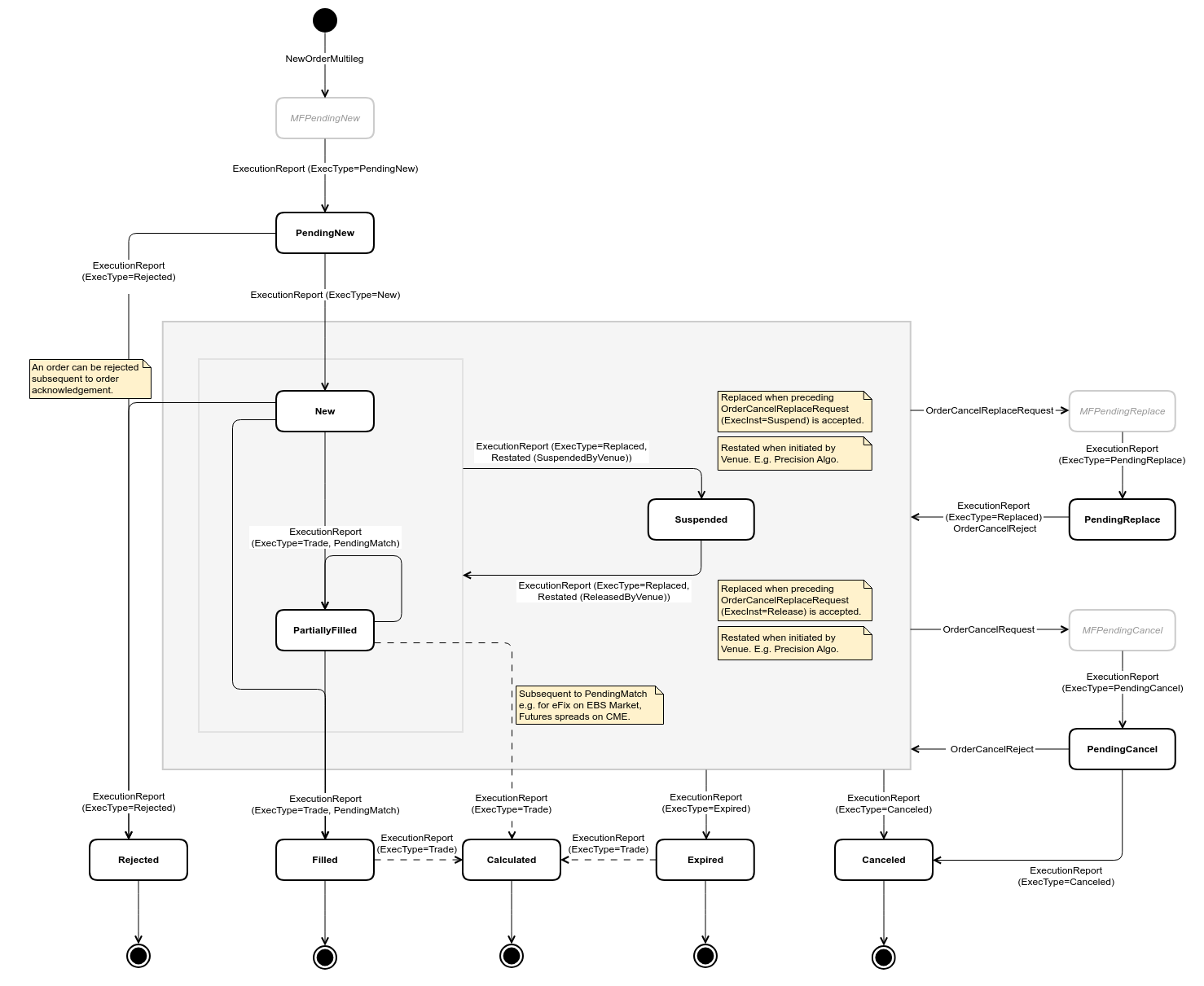
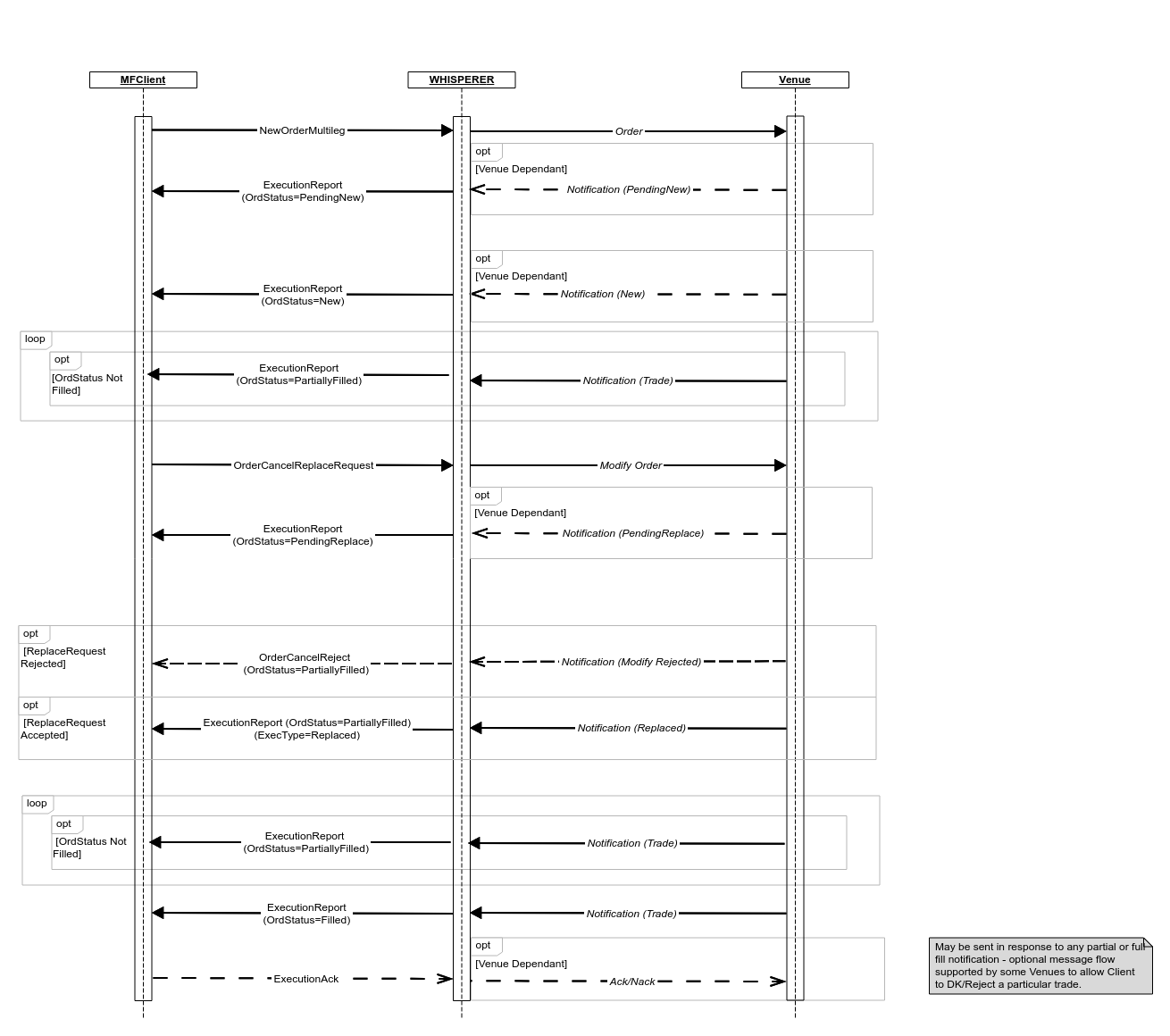
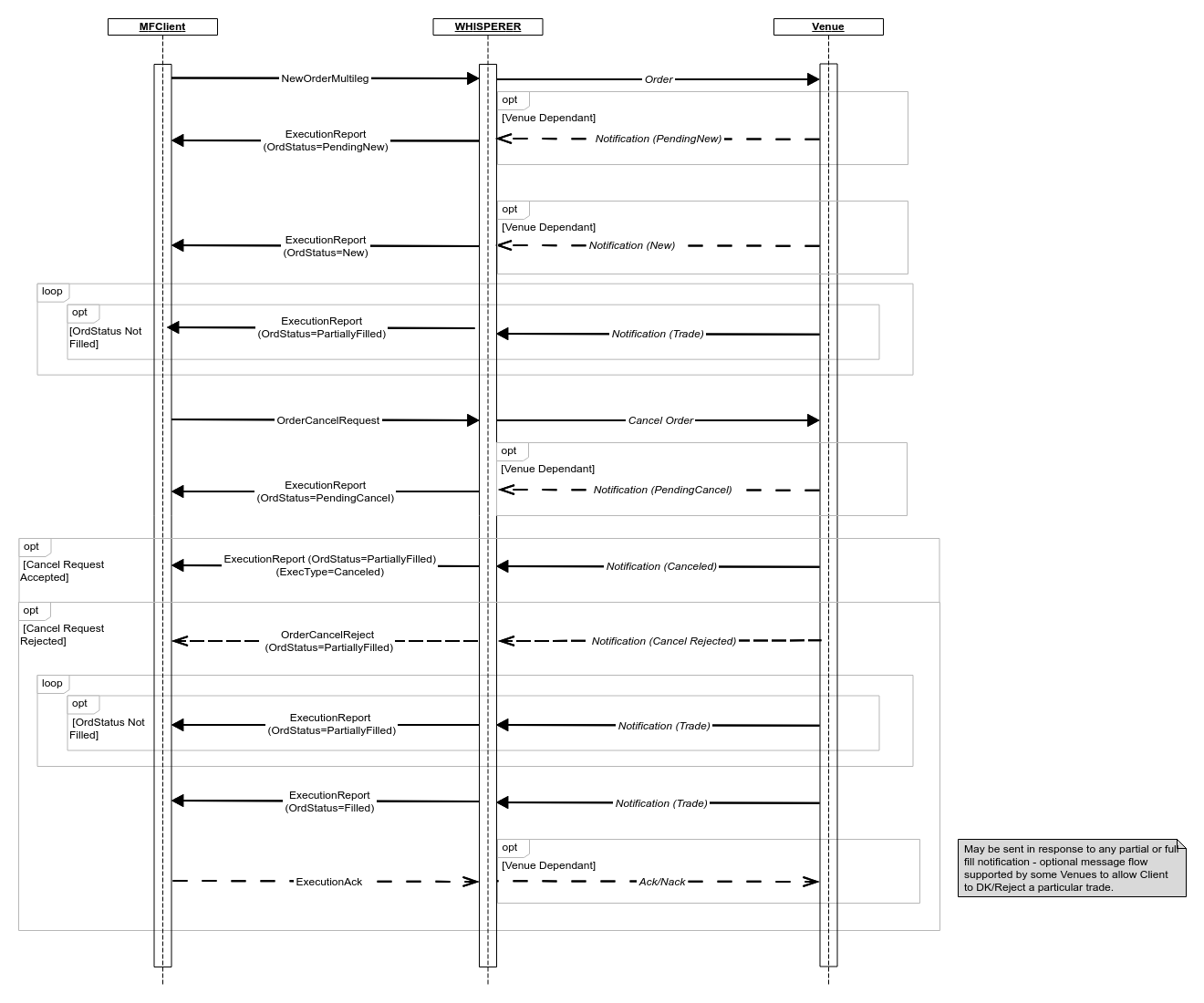
The Orders workflow is always normalised and consistently implements the state transition model as outlined in the diagram below. Where Venue events are absent, synthetic equivalents are generated by Whisperer in their place. These messages are easily discernible by reference to the TradingFlags.IsSynthetic field.
ExecutionAck
It's worth remembering that while all inbound messages will adhere to the same state transition model, there will necessarily be Venue-specific variation in whether and how outbound ExecutionAck messages are handled.
Order State Transition Diagram
Order Submission and Modification
Order Cancellation
Overview
Content Tools