Pricing
Subscription Management
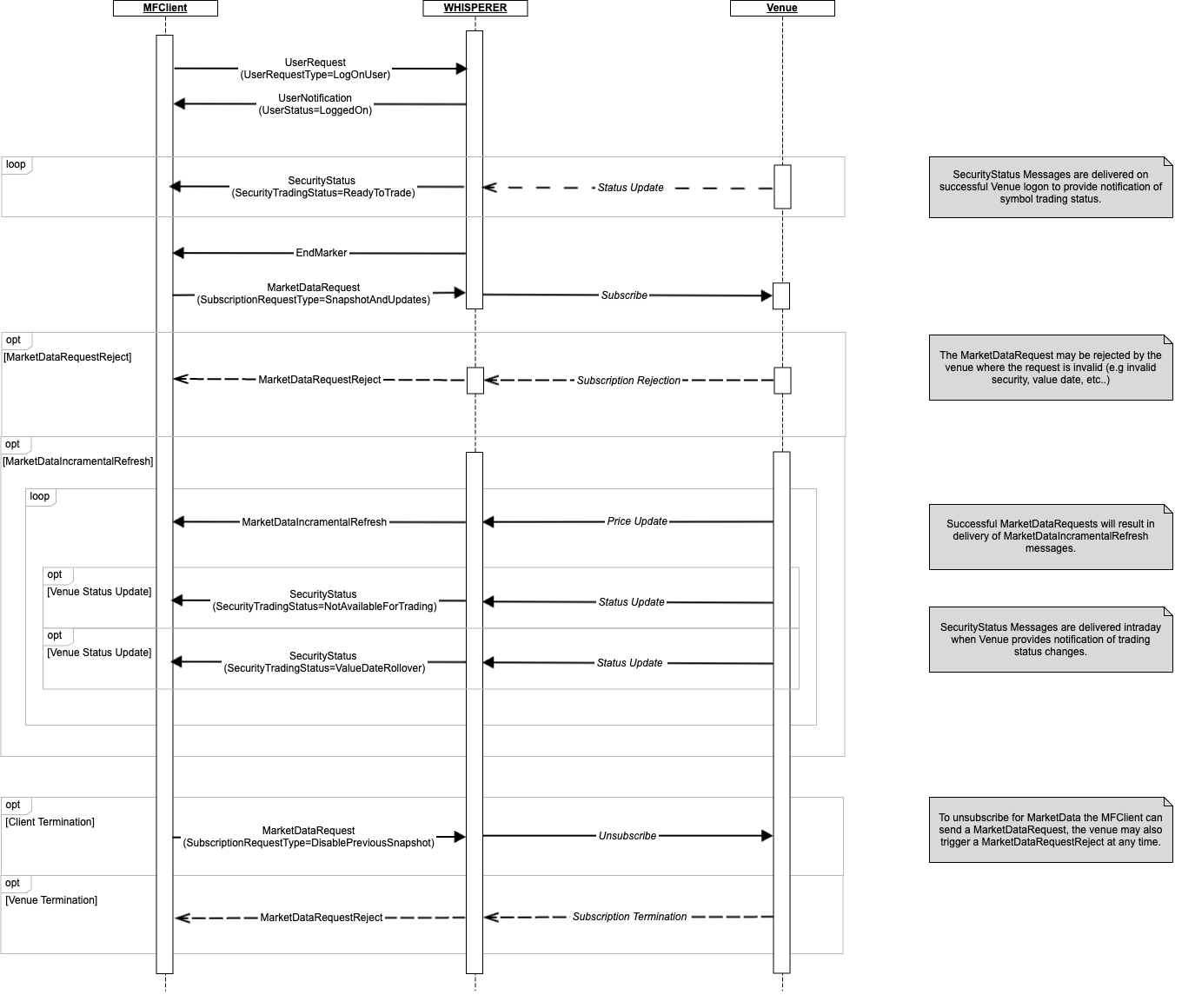
SecurityStatus Messages
Security Status messages communicate static attributes of each instrument supported by the Venue and are delivered on successful connection to a CLOB Pricing session.
Should Whisperer be notified of changes for an Instrument, these messages will also be used to deliver intra-day updates. Typical scenarios are value/trade date rolls & changes in trading status (open/halted).
The usage of specific fields is elaborated below:
- ContractMultiplier - This is aka Lot SIze. whilst there are a few FX venues to allow the client to trade standardised contracts (e.g. LMAX), this is primarily present for trading Futures on venues such as the CME. For most venues, the contract multiplier returned will be 1.0.
- MinQty - This is the minimum allowed Order size for the Venue. given that the venue may be trading in terms of contracts, the client may safely assume that this quantity is expressed in ‘nominal’ units (e.g. contracts) and not in total units.
MarketData Messages
Incremental Processing
Whisperer delivers market data in the form of incremental updates, wherever possible. When a venue message is known to be a snapshot, this is reflected with MDFlags.IsSnapshot = TRUE and NoMDEntries[*].MDUpdateAction = New.
Standard incremental processing is expected, with clients making direct reference to NoMDEntries[*].MDUpdateAction and applying New/Change/Delete actions against each associated MDEntryID. It is important that the NoMDEntries repeating groups are processed in the exact order given.
The population of the NoMDEntries group will vary with the MDUpdateAction as follows:
All-MDEntryIDandMDUpdateActionare always provided.New- all other available fields will always be provided.Change- typically, only the fields that have changed will be provided.
Performance considerations
For Change events, the following principles apply:
- If the venue also delivers unchanged fields in addition to those that trigger the update, these will also be supplied.
- In the typical case where the venue only delivers the modified fields, Whisperer does re-populate the previously published fields.
Delete- by definition the entry is no longer valid, so there is no need to redeliver the state of the outdated entry.
Book Depth
Where clients subscribe for custom book depths against a given Venue, it is important to understand that entries that are pushed below the requested depth by more competitive orders will not necessarily result in an explicit Delete for the client to process. I.e. such movements may be treated as an implicit delete by the Venue with the expectation that such entries are identified and deleted by the client as part of their book management workflow.
Book Management
Please refer to Liquidity Representation for an overview of CLOB market data structures.
OrderDepth books are characterised by there being the possibility of many orders at each Bid or Offer price point. In order to ensure that this book is maintained correctly the Client must order it first by Price (best to worst), and then by Age (oldest orders first) for each given price.
PriceDepth books are a simplification of this since we know that they are an aggregated view of the raw OrderDepth data, so there is only ever a single entry for any given Bid or Offer price point. The same applies for other aggregated views - Spread, VWAP etc.
The MDEntryID is always used as follows for the two book types:
- OrderDepth - MDEntryID provides a unique identifier of that individual Order, as and when the order is modified it's ID will change. Additional linkage information may also be provided by the venue so the market data consumer can track each individual order through it's entire lifetime. Whisperer currently delivers this in the NoEntryPassthruFields block, if available.
- PriceDepth - here the MDEntryID represents a specific side/price level and so could be used to give the correct book ordering. Typically it will be a string representation of either the price itself, or the level within the book (position number).
In order to ensure a consistent processing model across both book types, the client may implement an efficient equivalent of the following:
- Process the individual updates contained within the market data message.
- Collect the orders by price level. This is redundant for a PriceDepth book, which is already aggregated.
- Sort prices for each side of the book best to worst. I.e. The Client always sorts the book by price for each side (not MDEntryID).
- For each price level at or above the subscribed MDBookDepth, sort MDEntryIDs smallest (oldest) > largest (newest). Again, this is redundant for a PriceDepth book, which is already aggregated. I.e. the MDEntryID is a secondary key for OrderDepth books, to sort multiple orders at a give price level.
- Delete any entries that have moved below the subscribed MDBookDepth.
Orders
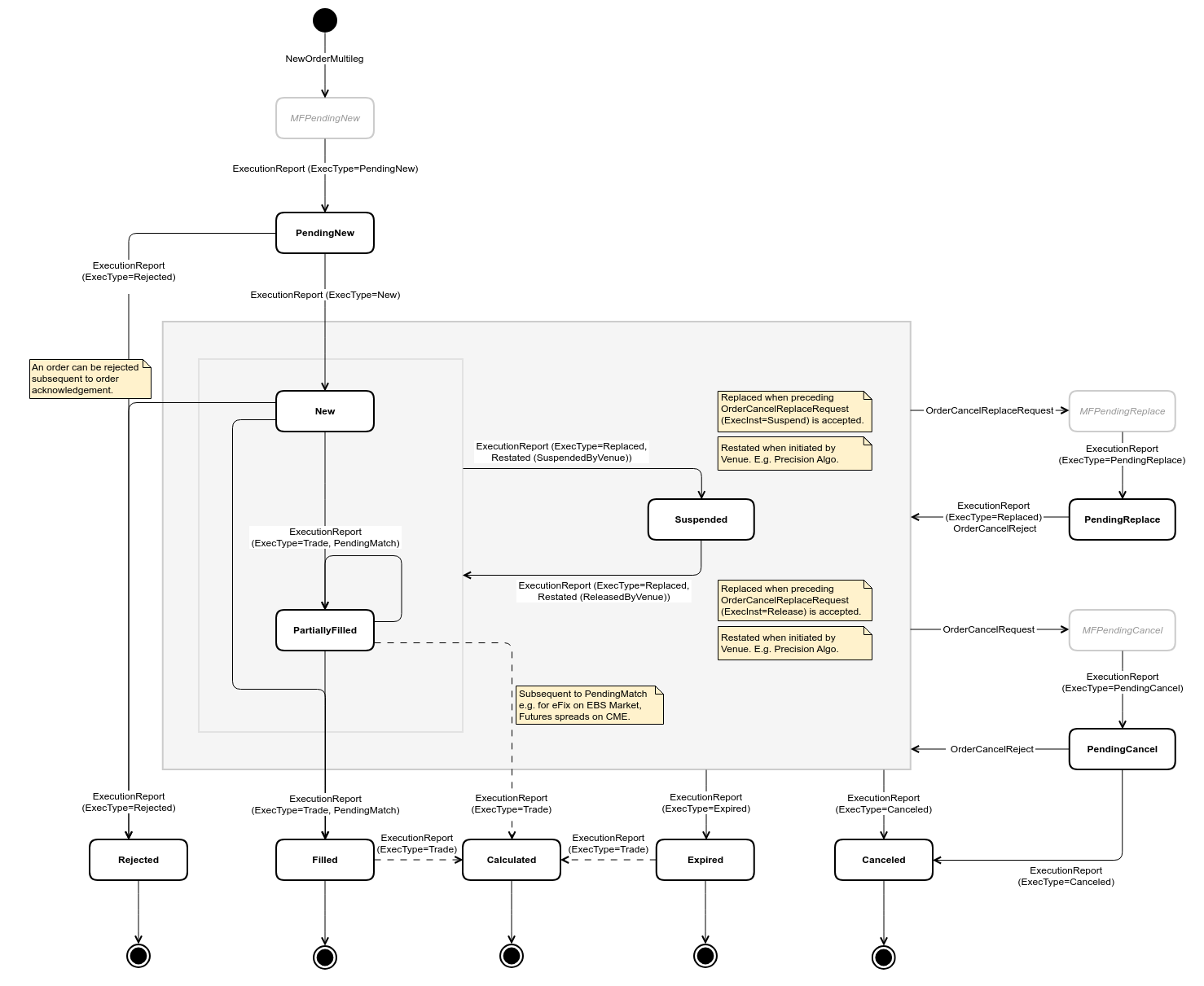
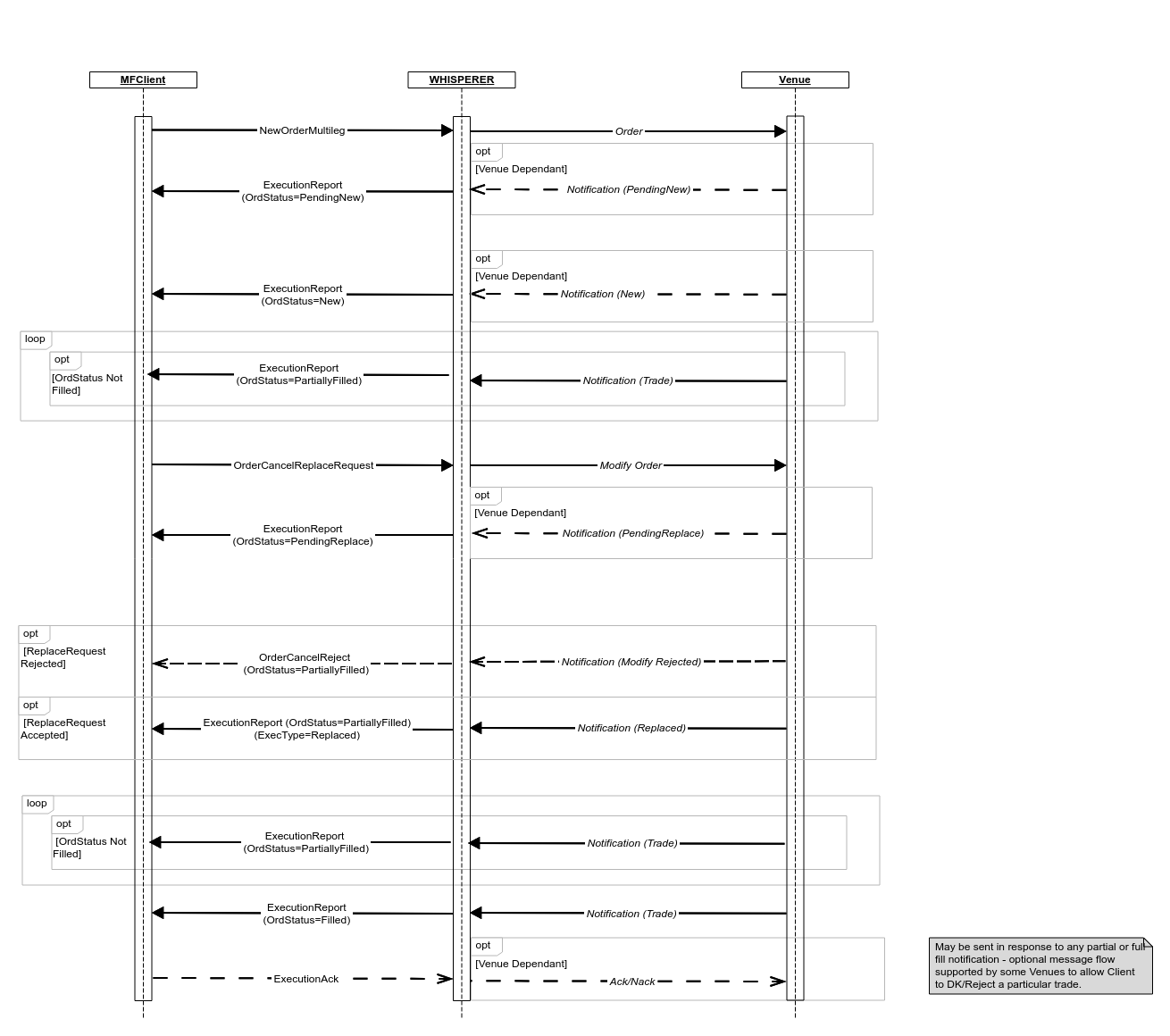
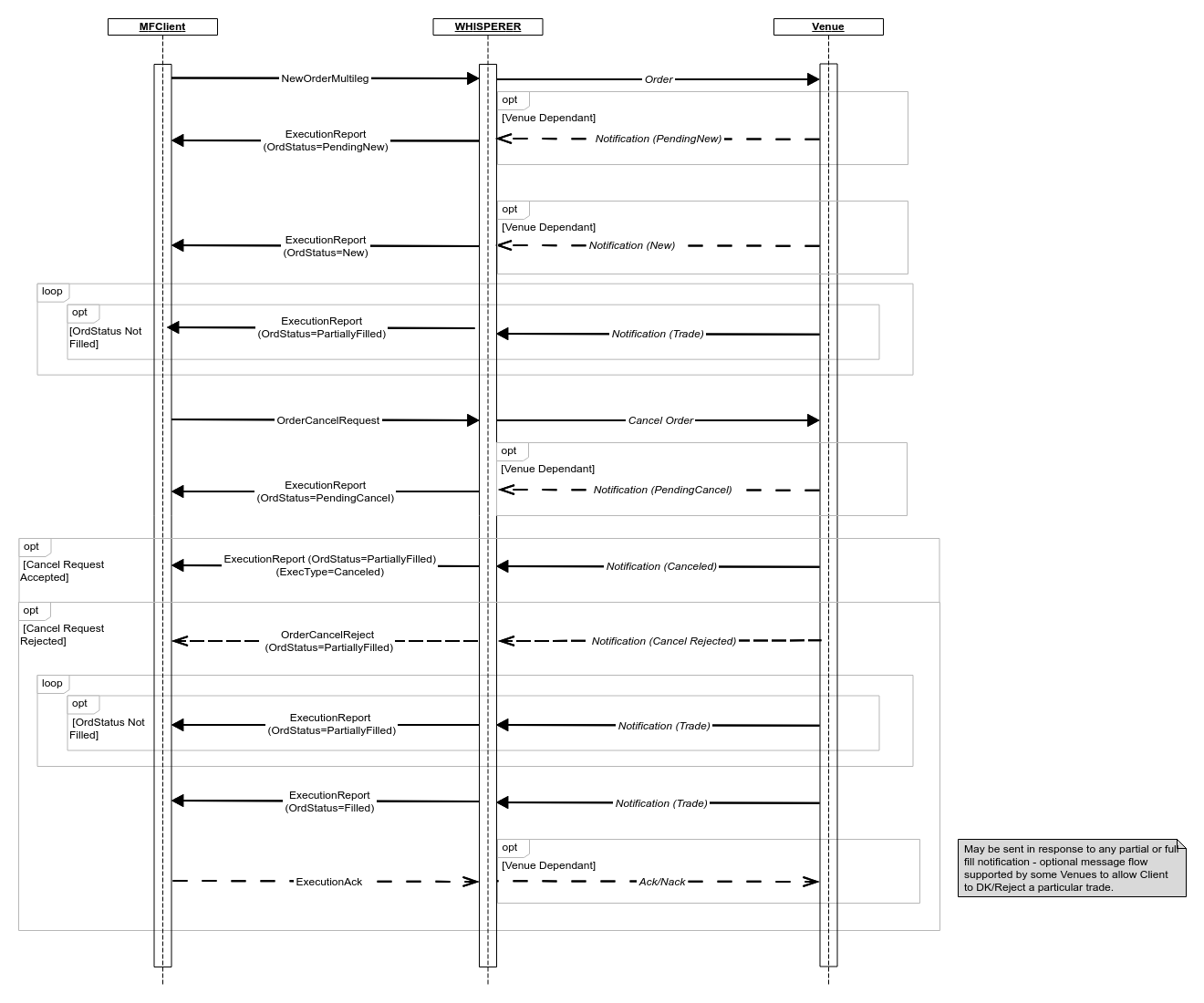
The Orders workflow is always normalised and consistently implements the state transition model as outlined in the diagram below. Where Venue events are absent, synthetic equivalents are generated by Whisperer in their place. These messages are easily discernible by reference to the TradingFlags.IsSynthetic field.
ExecutionAck
It's worth remembering that while all inbound messages will adhere to the same state transition model, there will necessarily be Venue-specific variation in whether and how outbound ExecutionAck messages are handled.
Order State Transition Diagram
Order Submission and Modification
Order Cancellation
Overview
Content Tools