Bloomberg Functions
- FXQT - Access the Bloomberg Beta environment.
- FXPV - Maker function to configure deal-code(s) and clients for ESP and RFS.
- FXPF - In order to test RFQ BRL split settlement., untick "Non-deliverable Strict Mode" if you wish to support and test On/Off-shore trading. Under the general tab select "Flexible Spot Out to SPOT" and "Allow Split Settlement". NOTE: This is a specialized and custom setup, with only a handful of regional Brazilian banks supporting it for LATAM clients trading USD/BRL onshore.
- FXTB - FX Trade Blotter
- FXTG - FX trading Grid (ESP)
- BGPI/ENFB - Bloomberg Global Person Identifier administration screens. The Maker manages the necessary MiFID EDM/IDM "Natural Person" values here. NOTE: Algo IDs are maintained by Bloomberg.
- APOD - User/Terminal Administration.
- FXBM - FX Batch Manager. Taker function for Batch/Block trading.
- FXEM - FX Execution Manager. Taker function, also used for Batch trading.
- FX - FX Information Portal.
- EC - Enterprise Console, used to maintan TLS Certs for FIX sessions. Typically, MarketFactory will use use this on behalf of our Clients. If this should not work, use https://console.bloomberg.com/#/firm/ODkyODQ3/creg-tls-ui/fix-tls-mgr
- HELP <XXX> - opens Bloomberg Help page for a given function, e.g. HELP FXGO
Web Admin
https://service.bloomberg.com/portal/welcome - Used to administer contracts renewals etc.
Functionality
RFS
- Spot transactions are conducted in XOFF environment only
- BMTF, BTFE and BSEF environments must be specifically enabled by Bloomberg
- BMTF and BTFE environments are used for MTF and EMIR regulatory trades
- NDF and NDS may be traded in BSEF environment only
- Algo ID must be provided by Bloomberg; Short Code ID(s) may be created by Bloomberg users via BGPI function
- Components marked in Spec, which tied to specific environments must be used only for those environments. For example, components required for SEF must be used in BSEF only.
- Commodities - regulatory fields N/A
- CASH - presently not supported; Depo-related fields N/A
- Split Settlement requires special setup from Bloomberg; Tag 22432 - SettlQualifier - is used only for Split Settlement transactions
- A client may either cancel a previously submitted quote, or mark a quote as indicative. In either case, the result will be that Bloomberg remove the previous quote from the GUI.
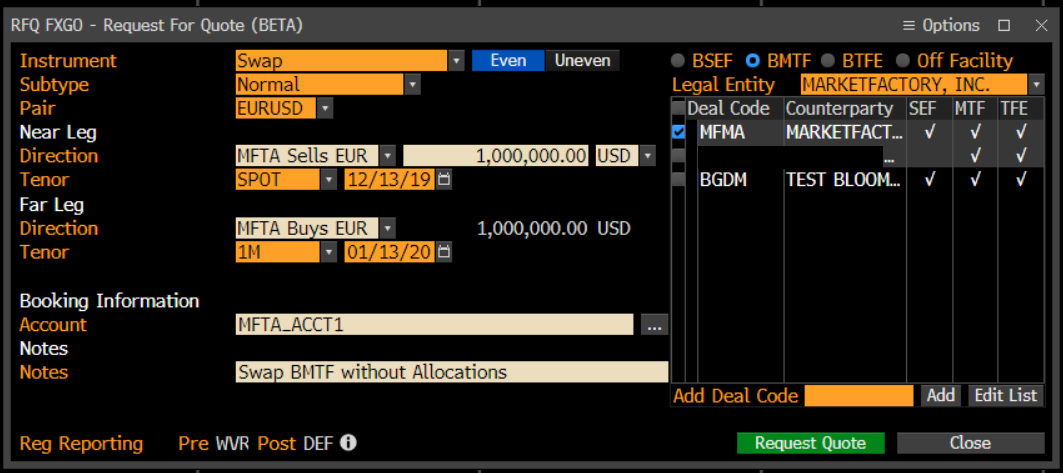
- "Reg Reporting" and "Pre WVR Post DEF" fields are available only when BMTF or BTFE environments chosen
- Improperly built messages will result in either error reports from Bloomberg or won't be processed
- Some fields are required for 2-legged transactions only
- Bloomberg ID Source is the same for both Regulatory Trade IDs and Allocation Regulatory Trade IDs
- BRL is deliverable onshore.
BRL Split Settlement
Split settlement allows the client to specify different settlement dates/tenors for each currency in the trade.
- Available only for Spot transactions in XOFF environment
- Available in RFS mode only
- A client must be specifically enabled for Split Settlement by Bloomberg
- Applicable only to specific currency pairs, like USD/BRL
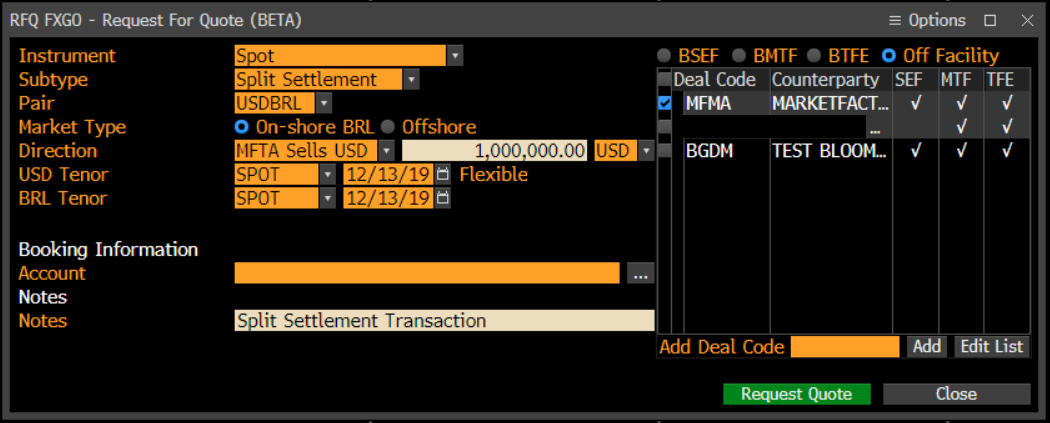
- An enabled client can launch his RFQ FXGO icon and select "Subtype" as "Split Settlement"
- Then a client can change change base currency Settlement Date, which has "Flexible" label to the right, as on the screenshot below
Batches
- Commodities (metals) - traded in XOFF only, regulatory fields N/A
- Only Spot, Outright and NDF LegProductTypes are allowed. Two-legged Swap and NDS securities are split into Spot, Outright and NDF products, respectively
- Environment is the same for all products within a batch.
- Batch contains products for one currency pair only. If another pair is used, a new batch will be created automatically. Moreover, a change of settlement currency will also result in new batch.
- Every product in a Batch can be priced as either Buy or Sell, but never both, unlike RFS, where two-way pricing is available.
- Its possible to upload Batches from Excel. The steps are:
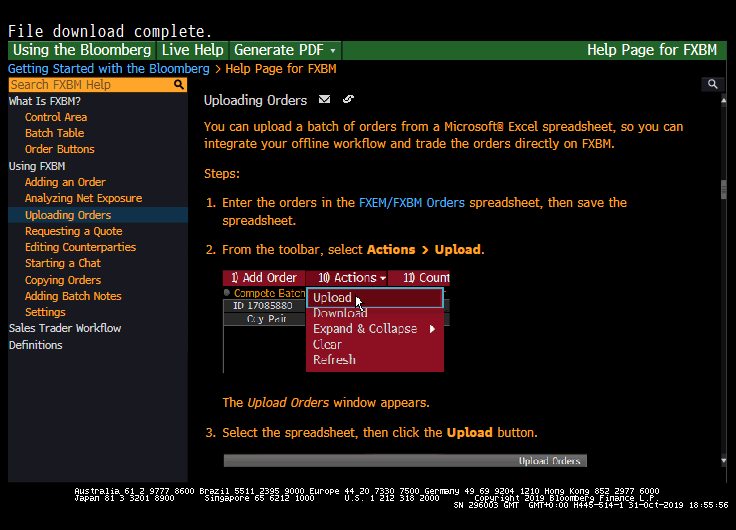
1) Run HELP FXBM<GO> on Bloomberg Terminal
2) Select "Uploading Orders" option in the left column
3) Download the template spreadsheet by clicking on "FXEM/FXBM Orders" blue link, as per the screenshot below
4) Enter the necessary information into the spreadsheet, template "C.UPLOADING A BATCH INTO FXEM"
5) Drag and Drop this template into your FXBT screen.
ESP
The Trading Grid is used by Takers for ESP pricing and trading against configured Makers.
Supported products:
- SPT - For SPOT ccy pairs, G10's etc.
- FWD - For pre-spot tenors in certain ccy pairs. Example: EUR/RUB, for Russian/Baltic regional banks.
- NDF - Can be traded if supported OFF-FACILITY and ON SEF / MTF / TFE.
- NOTE: SWAPS are not supported at all in FXTG and can be ignored.
FWD/NDF ESP requires special setup by Bloomberg.
Whisperer will transform each individual MassQuote message sent by the Client into two separate messages to Bloomberg, as the Venue requires that Forward Points are streamed separately from Spot prices for FWD and NDF products.
Pricing details:
- All products - both Bid Size and Offer Size must be greater than zero.
- All products - Bid Size must equal Offer Size
- All products - Bid and Offer must both be either Executable or Indicative.
- NDF/FWD - 6 decimals max.
PartyIDs
Please refer to either 360T TEX - PartyIDs, or Whisperer Enterprise - PartyIDs for the full Enterprise table across all venues.
Rejection of Quote Requests
Whenever Liquidity Provider rejects a request for quote(s) from Bloomberg in RFS, ESP or Batches mode, he must provide a text field with contact email for his e-FX support team.
Regulatory Fields
Please refer to either Bloomberg FXGO - Regulatory Details, or Whisperer Enterprise - Regulatory Fields for the full Enterprise table across all venues.
Passthru Fields
Please refer to either Bloomberg FXGO - Passthru Details or Whisperer Enterprise - Passthru Fields for the full Enterprise table across all venues.
Overview
Content Tools