Synopsis
The Historic Tick Streamer (HTS), when deployed to an SBE Whisperer instance, can be subscribed to by enabled users. The service comprises of a replay server to which the MFClient connects (in the same way as the connection to a FeedServer), alongside Whisperer logs held on a storage array used to store the marketdata messages on the horizontal axis of the diagram below. Behind the operation of the replay server are the configuration and authentication services that allow users to gain access to the service.
Note
At this time the Historic Tick Streamer is not available for Whisperer classic implementations that are not using SBE.
Historic Tick Streamerg Design
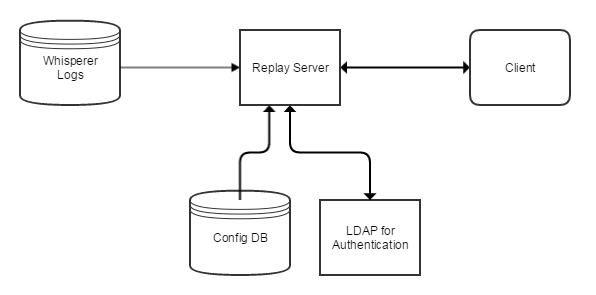
Operation
The HTS function allows MFClient users to request the playback of marketdata messages from the production environment when a request is made specifying the Feed, Market(s) & DateRange, playback also has the benefit of enabling the replay of market data messages on multiple streams simultaneously.
Note
It should be noted that Playback using the HTS can be permitted on a single Market (security/currency pair) or multiple Markets dependant on the client need. additionally, when specifying the start date and time to begin the stream, the stream will continue until the end of the available day is reached unless an end time is specified.
The HTS was designed to be adopted by existing Whisperer customers requiring little or no modification to the client code base. This would provide MFClient users the ability to subscribe to the playback service, the client application can then feed the data into a test harness to evaluate new algorithms and software updates against past market events and messages.
HTS Playback for Investigations
Marketdata playback can also be used to investigate issues, events and software failure. In an event that a system encounters a problem during normal operations, a clients development team can use the playback function to effectively recreate the scenario in UAT. This can often mean playing back a specific event in high fidelity within a recycling loop, at higher and lower speeds once the customer application has the messages (maybe even tick by tick with manual progression - like a user pressing a button) to drive the system.
The HTS function executes playback by sending the messages to the MFClient as quickly as the customer application can consume the messages, which is often at a faster rate than the trading venue originally sent the message. This replay offers a look at the depth of book and includes messages for last traded, providing a clear view of the market at the time of the replay.
Overview
Content Tools