immediate-or-cancel orders These orders are placed by setting the timeInForce SubmitOrder.timeInForce to TimeInForce.IOC (immediate or cancel).
To cancel an order, call cancelOrder() method with the orderID or clOrdID of the order to be canceled. If the order is already filled or the Id is invalid, the cancellation will be rejected. Whisperer will instead respond with a OrderCancelRejected message that will contain the reason for rejection.
Complete IOC Fill An OrderDone message signals the completion of the order and that it has been fully filled.
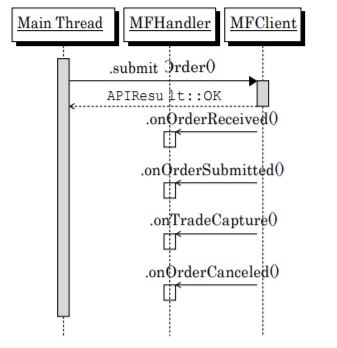
Figure 8.13. – Partial IOC fill 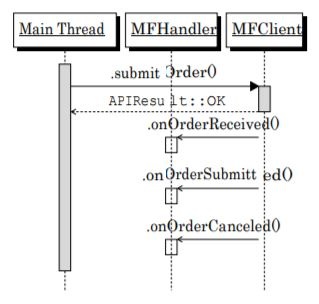
Figure 8.14.– IOC miss – nothing done
Partial IOC Fill This occurs when part of an order gets filled the sequence concludes with an
OrderCanceled event for the remaining size of the order.
IOC miss If no part of the IOC order can be filled, it is cancelled without any TradeCapture
events.
IOC with Minimum Quantity If the minimum quantity cannot be filled, it is cancelled. If the minimum quantity can be filled, the order results in trade captures. If there is a remaining amount, it is subsequently cancelled:
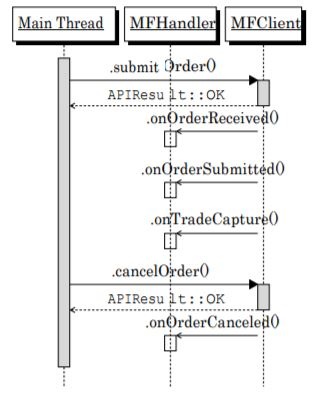
Figure 8.15. – Cancellation after partial fill
Resting (GTC) Limit Orders Resting orders are specified by using timeInForce GTC, and orderType as orderType.LIMIT. They remain in the order book of the ECN until fully filled or cancelled.
Complete Fill This sequence is similar to the Complete IOC Fill except that there may be arbitrary time passing while some of your order sits on the book to be filled:
Resting (GTC) Limit Orders with maxShow maxShow is used to specify the amount to display in the market. It can be used in conjunction with resting limit orders:
Cancelling after partial fill Resting orders can be cancelled after partial fills. On ECNs where trade captures can have either a PENDING or DONE state, trade captures with a state of DONE may be received after the OrderCanceled message is sent.
(one or more trade capture sequences which have a status DONE may be sent, in the case where there are PENDING trade captures sent)
Resting (GTC) Market-Limit Orders Orders with orderType set to MARKET_LIMIT are executed at the best market price. The remaining amount remains in the order book at the specified limit price:
Resting (GTC) market orders with protection Orders with orderType set to MARKET_PROTECTION
are executed at the best market price. The remaining amount remains in the order book at the limit price of best market +/- Protection Points (depending on whether the order is a bid or offer).
For an offer, the Protection Points would be subtracted. Protection Points are specified by the CME. See here
Resting (GTC) Stop-Limit Orders with orderType set to STOP_LIMIT are activated when the stop price is traded in the market. The order then becomes a limit order, using specified limit price.
Resting (GTC) Market-Stop Orders with Protection Resting (GTC) Stop Orders with Protection (with orderType set to STOP_PROTECTION) are activated when the stop price is traded in the market. The order then becomes a limit order of stop price +/- Protection Points.
For a bid, the Protection Points would be added. Protection Points are specified by the CME. See http://www.cmegroup.com/confluence/display/EPICSANDBOX/GCC+Price+Banding
Overview
Content Tools