This page sets out the key aspects of establishing and managing sessions between a Whisperer Enterprise Client and a Feed Handler. In addition details are provided setting out how to initiate or terminate connectivity to the target Venue.
Overview
Terminology
- Customer - The organisation utilizing MarketFactory's systems.
- Client - The software component(s) maintained by the Customer that are used to communicate with Venues via Whisperer
- User - A logical entity defined by the Customer and configured by MarketFactory, used to associate a Client Session with a Venue Connection.
- Venue - External trading system - may be a Maker (e.g. a Bank), a Taker (e.g. an ECN), or a CLOB.
- Logon Service - Whisperer's security and session administration component.
- Gateway - The Whisperer component responsible for maintaining connectivity with a Venue.
- Venue Connection - A connection established between the Gateway and the Venue. Typically this will be a single FIX session (i.e. a specific Target/SenderCompID pair), but in some cases this may incorporate additional physical connections - for example, a Pricing session for a CLOB may comprise A/B UDP market data feeds in addition to a standard TCP FIX session used for message recovery.
- Client Session - A connection maintained between the Gateway and a Client User, dedicated to delivering messages between the User and the Venue for a specific Session Type.
Sessions
Session Types
Whisperer Enterprise maintains the following session types:
- Pricing
- Delivery of Market Data from a CLOB Venue.
- ESP mass-quotes from a Maker MFSBE4 Client to a Taker Venue.
- ESP mass-quotes from a Maker Venue to a Taker Client.
- Orders
- Submission and execution of MFSBE4 Client orders against a CLOB Venue.
- Orders against ESP liquidity (published on a separate Pricing session) from a Taker Venue to a Maker Client.
- Orders against ESP liquidity (published on a separate Pricing session) from a Taker Client to a Maker Venue.
- RFS
- Full RFS/RFQ quotation negotiation life cycle between Maker Client and Taker Venue.
- Full RFS/RFQ quotation negotiation life cycle between Taker Client and Maker Venue.
- DropCopy
- Delivery of post-Trade Straight-Through Processing (STP) trade notifications. Typically this will be restricted to notifications from dedicated Venue API connections only.
For a given Client and given Whisperer Gateway deployment, each session type will be assigned unique Venue connection credentials (typically target IP:Port details and associated Target/SenderCompIDs, but potentially additional details such as Username and Password, PKI certs, etc).
Session Architecture
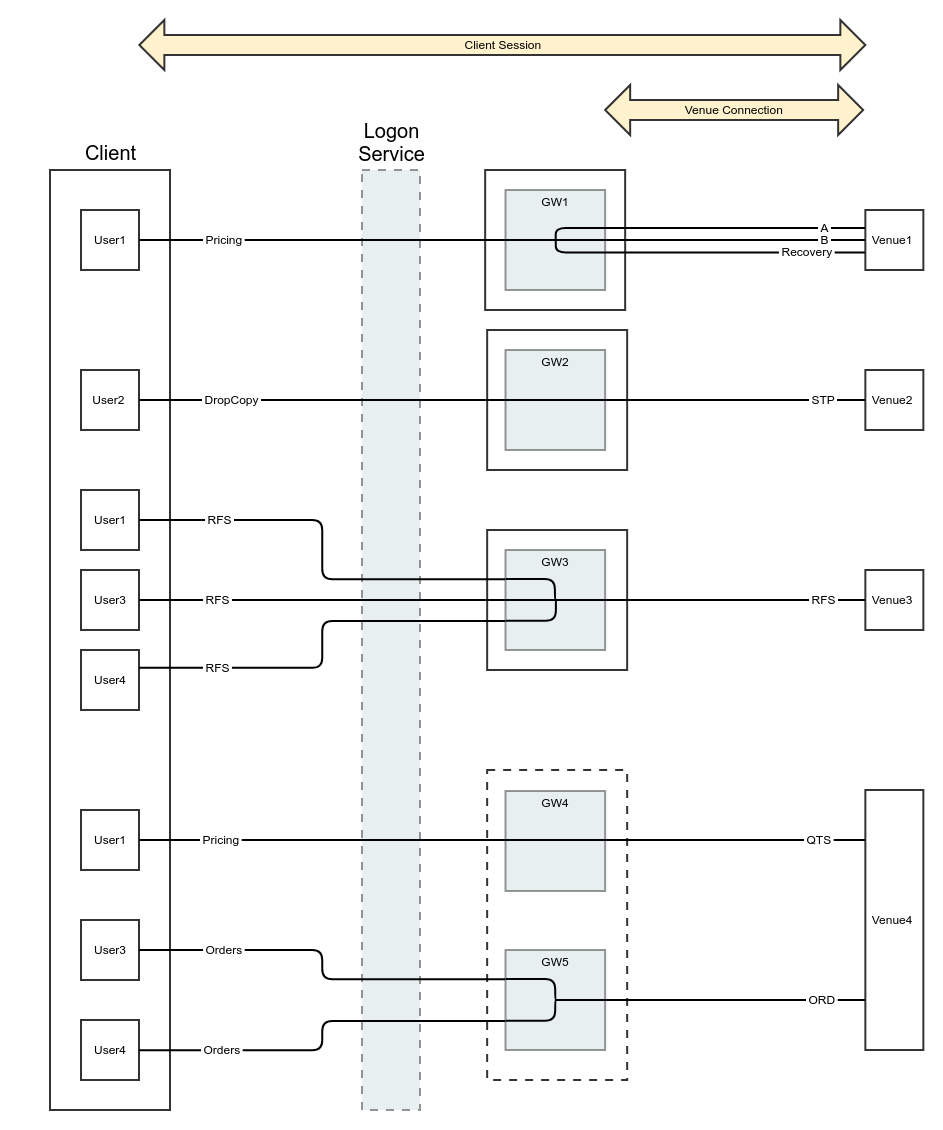
24x5.5 Availability
All session types are maintained directly with an individual Whisperer Gateway. All Gateways are available 24 x 5.5 - the full trading week commencing on Sunday prior to Asia-open and ending on Friday, NY-close, irrespective of the schedule of the Venue itself.
Message Header
In addition to the default SBE message header fields (blockLength, templateId, schemaId and version), the MFSBE4 header additionally defines the mandatory population of the following fields:
- messageLength - this is provided to allow verification that the full message has indeed been received (e.g. should it span multiple packets).
- sendingTime - nanosecond-precision timestamp indicating when the message left the sender.
- msgSeqNum - this is the standard integer message sequence number. When first establishing a connection at the start of a trading week, it should be set to '1', and incremented with every subsequent message sent for the remainder of the trading week.
msgSeqNum
This field should never be reset intra-week, for any session type.
If the Client should disconnect from Whisperer during the trading week, it must continue the message sequence when re-establishing the session.
Additional Material
Further detail is provided in the following page(s):
Overview
Content Tools