This page sets out the key aspects of establishing and managing sessions between a Whisperer Enterprise Client and a Feed Handler.
Logon
A FIX session is only fully established when the following stages are complete:
- Socket connection established by the client to Whisperer Enterprise.
- Authentication: Implemented via the exchange of FIX Logon messages.
- Synchronization: Identification of lost/untransmitted messages and retransmission as necessary by either or both sides,
- Verification: Exchange of TestRequest and Heartbeat messages to explicitly confirm correct session establishment.
Authentication & Authorization
When the Client requires a new session with a Venue, it must first establish a TCP socket connection with the Whisperer Logon Service on a single, standard IP address and port - no matter the User, Session type, or Venue. Once connected, it must then send a Logon message specifying the desired session.
The Logon Service is responsible for the following functions:
- Authentication - validation of the provided Username and associated Password.
- Authorisation - verification that the User is permissioned for the specified SessionType and Venuename.
Should either of these checks fail, the Logon Service will terminate the connection without a Logout message.
In this event, the Customer should contact MF Support in order to confirm the validity of the specified credentials.
Otherwise the Logon Service will hand off the connection to the target Feed Handler. From this point on, the Client is communicating directly with the Feed Handler itself, neither the LogonService, nor any other processes are involved.
Message Persistence
All Whisperer Enterprise messages are exchanged over TCP, with connectivity maintained directly between the Client and Feed Handler - so message delivery and ordering are both guaranteed, whilst the socket connection is operating correctly.
A message is deemed to have been sent, and received, successfully when:
- The send completes successfully, and
- The TCP session remains up for a period subsequent to the send.
Previously Sent Messages
The MF FH guarantees persistence of sent outbound messages for possible resend for a minimum period of three heartbeat intervals, allowing for detection of dead connections as per 63805411, below.
Unsent Messages
Any unsent messages will be persisted indefinitely until either:
- End of Trading Week reset, or
- Client Logon and Client Session Synchronisation.
The table below specifies what messages are to be persisted and resent when necessary, as opposed to being gap-filled.
It will be noted that that all messages that represent stateful events are persisted and resent by the MF Feed Handler - but only these. It is the responsibility of the Client application to determine the appropriate response.
For sequence gaps identified on the outbound Client Session, it is entirely the responsibility of the Client application to determine which message types are to be persisted for possible resend. This is typically most important for Maker clients accepting or rejecting orders against Taker Venues, but other scenarios may need to be considered.
Resent messages are always characterised by:
- Msg.messageHeader.msgSeqNum populated with the original sequence number
- Msg.messageHeader.sendingTime populated with the resend time
- Msg.TradingFlags.PossDupFlag = TRUE
- Msg.OrigSendingTime populated with Msg.messageHeader.sendingTime of original message
Any message that the Client does resend may be forwarded to the Venue, so it is essential be aware of the impact that this may have.
| Message | Sent By | Received By | Persisted |
|---|---|---|---|
| Logon | Client (Both) | Feed Handler | No |
| LogonResponse | Feed Handler | Client (Both) | No |
| Logout | Client (Both) | Feed Handler | No |
| LogoutResponse | Feed Handler | Client (Both) | No |
| SequenceResetGapFill | Client (Both) | Feed Handler | No |
| Feed Handler | Client (Both) | No | |
| Heartbeat | Client (Both) | Feed Handler | No |
| Feed Handler | Client (Both) | No | |
| TestRequest | Client (Both) | Feed Handler | No |
| Feed Handler | Client (Both) | No | |
| SecurityStatus | Feed Handler | Client (TAKER) | No |
| UserRequest | Client (Both) | Feed Handler | No |
| UserNotification | Feed Handler | Client (Both) | No |
| ErrorReport | Feed Handler | Client (Both) | Yes |
| MarketDataRequest | Client (TAKER) | Feed Handler | No |
| MarketDataRequestReject | Feed Handler | Client (Both) | No |
| MarketDataIncrementalRefresh | Feed Handler | Client (Both) | No |
| QuoteRequest | Client (TAKER) | Feed Handler | Optional |
| Feed Handler | Client (MAKER) | Yes | |
| Quote | Client (MAKER) | Feed Handler | No |
| Feed Handler | Client (TAKER) | No | |
| MassQuote | Client (MAKER) | Feed Handler | No |
| Feed Handler | Client (TAKER) | No | |
| QuoteCancel | Client (MAKER) | Feed Handler | No |
| Feed Handler | Client (TAKER) | No | |
| QuoteResponse | Client (MAKER) | Feed Handler | Optional |
| Feed Handler | Client (TAKER) | Yes | |
| Client (TAKER) | Feed Handler | Optional | |
| Feed Handler | Client (MAKER) | Yes | |
| NewOrderMultileg | Client (TAKER) | Feed Handler | Optional |
| Feed Handler | Client (MAKER) | Yes | |
| OrderCancelReplaceRequest | Client (TAKER) | Feed Handler | Optional |
| OrderCancelRequest | Client (TAKER) | Feed Handler | Optional |
| OrderCancelReject | Feed Handler | Client (TAKER) | Yes |
| OrderTimeout | Feed Handler | Client (Both) | Yes |
| ExecutionReport | Client (MAKER) | Feed Handler | Yes |
| Feed Handler | Client (TAKER) | Yes | |
| ExecutionAck | Client (TAKER) | Feed Handler | Optional |
| Feed Handler | Client (MAKER) | Yes |
User Session Synchronisation
Whisperer Enterprise utilises the 'new' model of session synchronisation introduced in FIX 4.4. This ensures that each side can expect any sequence number gaps to be filled automatically, eliminating the need for ResendRequest messages - and the problems that historically accompany these.
The MFAPI Client initiates a new session with a Logon message - populating NextExpectedMsgSeqNum which contains the next msgSeqNum value that the Client expects to receive from the Whisperer Feed Handler.
The Whisperer Feed Handler validates the sequence number value as expected by the MFAPI Client as follows:
If the Client msgSeqNum is lower than the Feed Handler's expected value, or the Client is expecting a sequence number higher than the Feed Handler's next-to-be-assigned msgSeqNum, then this is an unrecoverable error and the Feed Handler will abort the session with a Logout message (using it's next sequence number).
The Customer should contact MF Support to agree the correct resolution actions.- Otherwise, the Feed Handler will issue a LogonResponse message - populating NextExpectedMsgSeqNum which contains the next msgSeqNum value that it expects to receive from the Client.
If the Client is expecting a sequence number lower than the Feed Handler's next-to-be-assigned msgSeqNum (as used in the preceding Logon response), then the message gap is resolved by the Feed Handler with SequenceResetGapFill messages and/or the resending of persisted messages as necessary. The preceding LogonResponse will be gap-filled over. A concluding TestRequest will be issued by the Feed Handler to confirm the end of the replay.
Should a Client specify a next-expected inbound sequence number too low (e.g. expecting '1' on re-logon just prior to weekly trading session close), then the Feed Handler will service most of the range to correct with a SequenceResetGapFill. For the more recent messages that are still persisted, these will be processed as normal.
The Feed Handler will not resend a week's worth of persisted messages. Refer to 63805411 above for more detail
- When the MFAPI Client receives the Feed Handler's LogonResponse message, the Client must behave in a similar manner, based on the returned NextExpectedMsgSeqNum value. Any message gap must be resolved by the Client with SequenceResetGapFill messages and/or the resending of persisted messages as necessary. The preceding Logon must be gap-filled over. The Feed Handler will issue a concluding TestRequest to confirm the end of the replay.
Irrespective of whether repays are required in either direction or not, the Feed Handler will always issue a further TestRequest to verify overall completion of the session synchronisation. Thus the Client may be expected to respond to one, two or three TestRequest messages in total to successfully Logon.
Deprecated Synchronisation Model
Prior to Release 2020.11.16.WE, the Whisperer Enterprise Client synchronisation model mandated that the Client signal its completion of session synchronisation with a TestRequest. On receipt of this TestRequest, the Whisperer Feed Handler would respond with the necessary Heartbeat and then signal its own completion of session synchronisation with a TestRequest in the opposite direction.
This is now deprecated and the Feed Handler issues all required TestRequest messages.
The Client may of course elect to issue TestRequest message at any time, as part of their own session verification logic.
In the sequence diagram below, the deprecated model is in red, whilst the replacement model is in green.
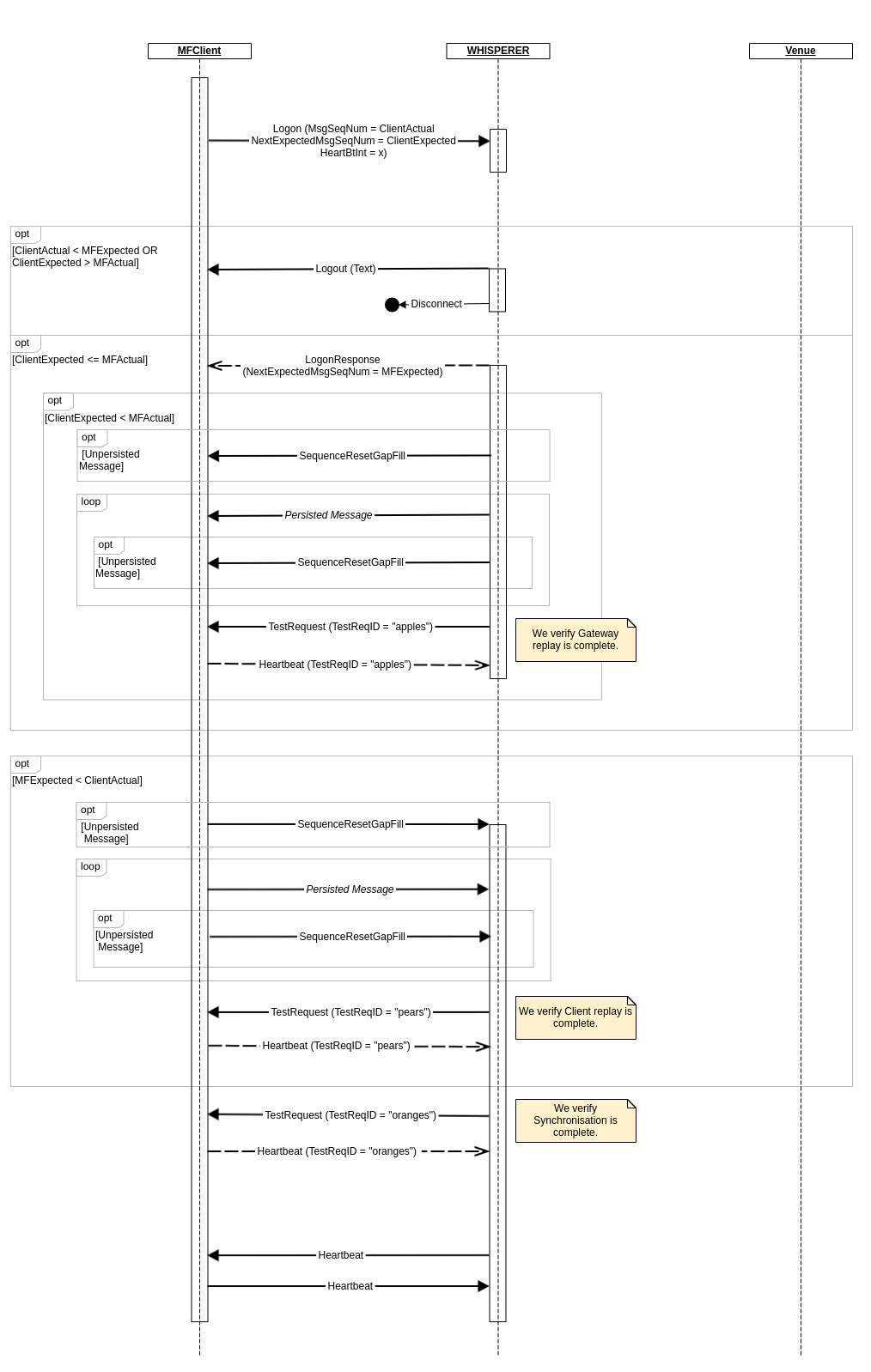
The Feed Handler TestRequest messages and Client Heartbeat (response) messages are required as verification that no sequence number gaps remain in either direction.
The Client should only proceed with new messages when these have been processed correctly. Any new (i.e. not SequenceResetGapFill or resent) messages sent by the MFAPI Client prior to the required Heartbeat responses will result in ErrorReport notifications.
Erroneous Scenarios
Second Logon to Existing Session
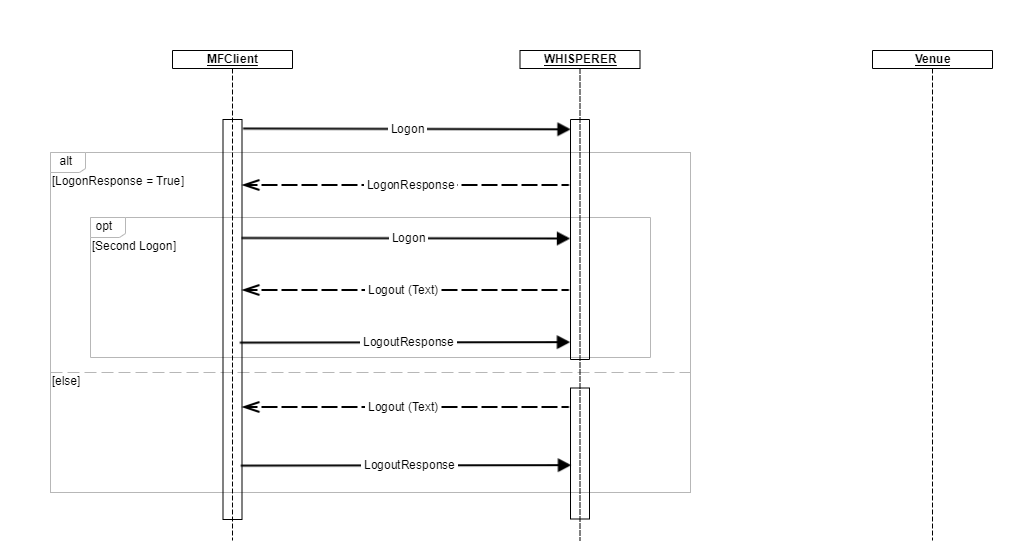
Any attempt by the Client to send a Logon message on an existing session that it established previously will result in the session being aborted.
Second Session for User/SessionType/Venue
Should the Client attempt to establish a second (additional) session using the same credentials as of a currently-active Client session, then it will be rejected. The original session will be unaffected.
Session Monitoring
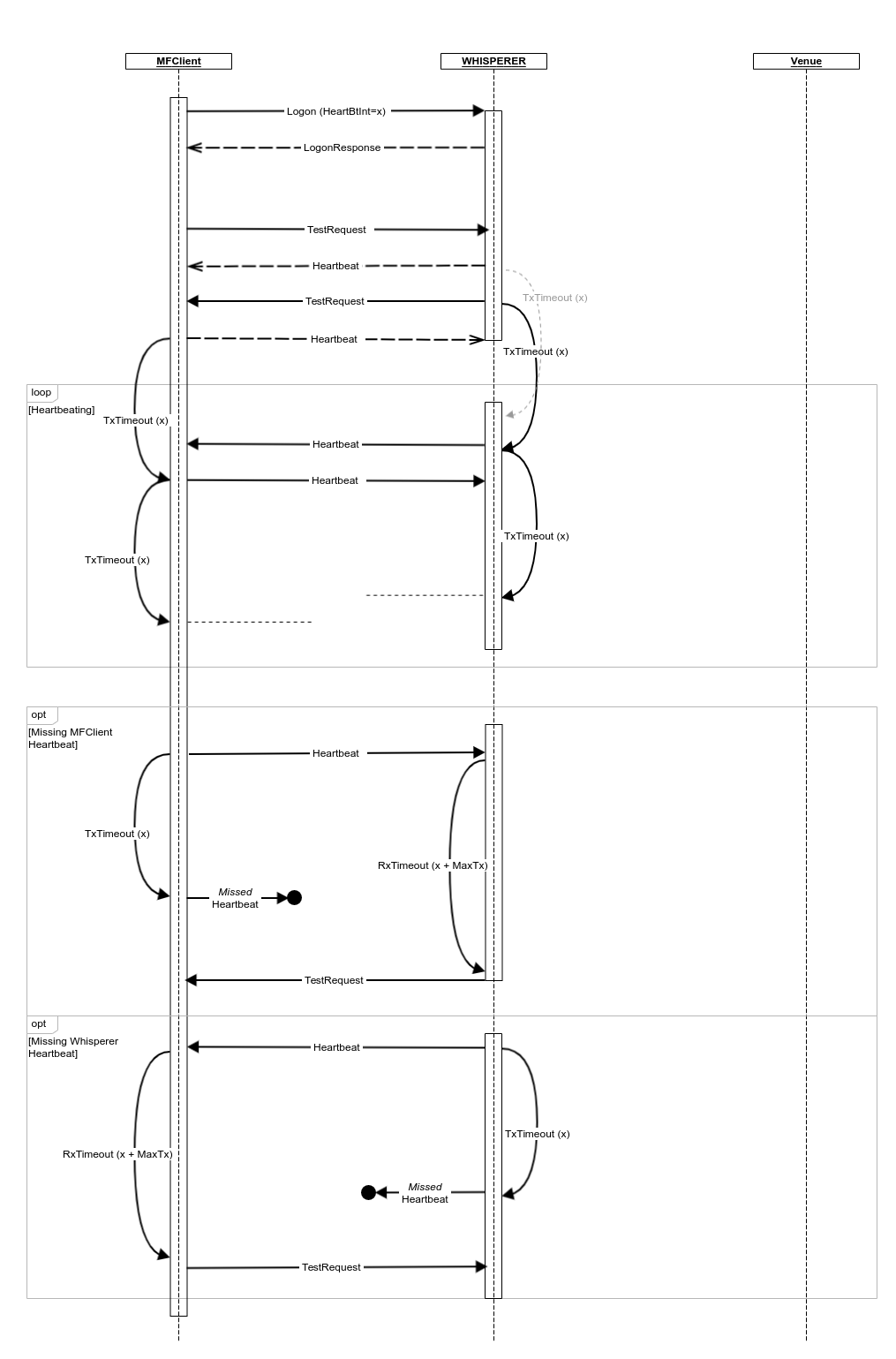
Active sessions are monitored at the application level by each party via Heartbeat and TestRequest messages. Indications of problems must result in the monitoring party aborting the session.
MaxTx
For inbound Heartbeat and TestRequest messages sent by the Client , the Feed Handler will allow a fixed maximum allowed message transmission time (MaxTx), currently set to one second, before treating the message as 'missed'. This is used to allow for some degree of hysteresis WRT message delivery latencies.
The Client may specify it's own MaxTx value and logic when monitoring inbound messages sent by the Feed Handler.
In both cases only the local clock is used as reference.
Heartbeats
Once the Client has successfully established a session with the Whisperer Feed Handler (i.e. on dispatch of the first Heartbeat message in response to the end of synchronisation TestRequest), subsequent Heartbeat messages are sent by each party as follows:
- The HeartBtInt value is specified by the Client in their Logon message and subsequently used by both sides of the Client Session, i.e. the Feed Handler will always use the interval specified by the Client.
- The heartbeat interval timer should be reset after every message is transmitted (not just heartbeats).
- On expiry of the heartbeat interval timer, a Heartbeat message must be sent.
A heartbeat is deemed to have been missed if it is not received within HeartBtInt + MaxTx seconds and must result in the monitoring party issuing a TestRequest.
Test Request
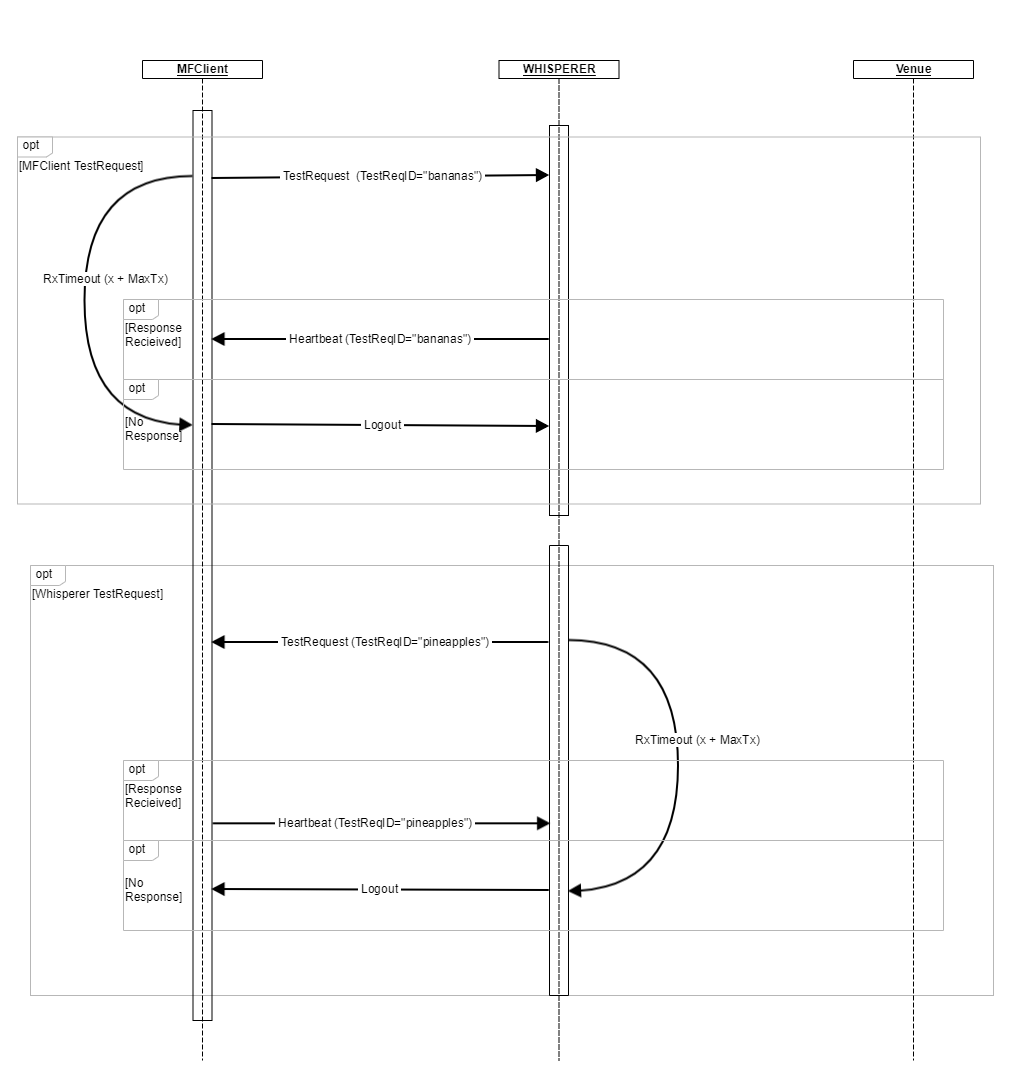
TestRequest messages may be issued by either party and under normal circumstances result in a Heartbeat being sent in response, echoing the specified TestRequestID.
TestRequest messages may be used to obtain an approximate indication of message round-trip times between the MFAPI Client and the Whisperer Feed Handler.
If no Heartbeat response is received within HeartBtInt + MaxTx seconds of the issuance of the TestRequest, then the party must abort the session with a Logout message.
Logout
The recipient of a Logout message must echo it with a LogoutResponse (using it's next sequence number).
- It is the responsibility of the Logout initiator to terminate the socket connection on receipt of the LogoutResponse.
- If no LogoutResponse is received within HeartBtInt + MaxTx seconds of the issuance of the Logout, then the session and associated TCP socket connection must be dropped.
All messages received by the Whisperer Feed Handler (from either the Client or the Venue) between the exchange of Logout and LogoutResponse messages will result in ErrorReport messages being sent to the Client.
Overview
Content Tools