The booking interface also allows orders to be credit checked against MarketFactory's NOP limit functionality. To enable this, make a request to MarketFactory support to enable this feature for the MFSession user. When credit checking is enabled, the account to apply the credit consumption and limits should be specified in the partyID field of the TradeCaptureReport message with PartyRole.CustomerAccount. A full list of the values should be given to MarketFactory support so that these accounts can be configured into Whisperer.
There are two main flows for booking with credit checking, a successfully booked trade and a canceled trade. Refer to the MFSampleStpBookingApp sample for example code.
In the successful booking flow, a trade is successfully booked into the system and the credit is consumed in the NOP system. In this flow, an initial TradeCaptureReportSpotForward is sent to Whisperer with ExecType.AllocateCredit. This will allocate the credit in a pending state. To finish booking the trade, enter an additional TradeCaptureReportSpotForward with the same execID with ExecType.Trade. This will signal that the credit is to be commited and that the trade is to flow to the back office system. If this is a partial fill (in other words, the amount filled in the ExecType.Trade message is less than in the ExecType.AllocateCredit) then the remaining amount outstanding's credit will be removed and only the partially filled amount will be booked.
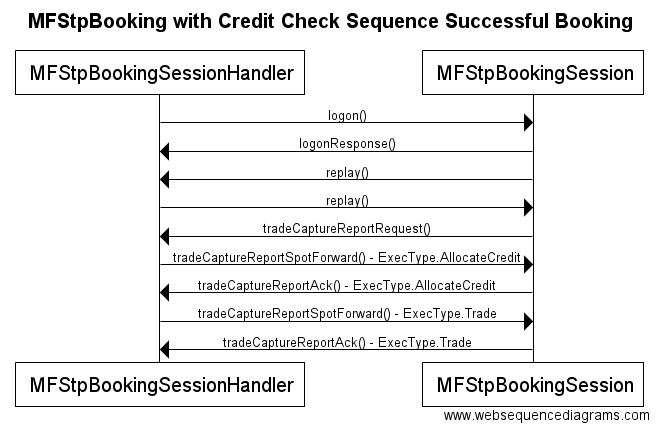
Figure 6.2. – MFStpBookingSession with successful booking. This shows the normal flow when a trade is booked.
The other major flow is for fills that need to be canceled after the credit is allocated. This is similar to the previous flow, except that ExecType.Canceled is set for the second TradeCaptureReportSpotForward. This will make the credit available again for consumption for the specified account. The fill will not be booked to the back office system
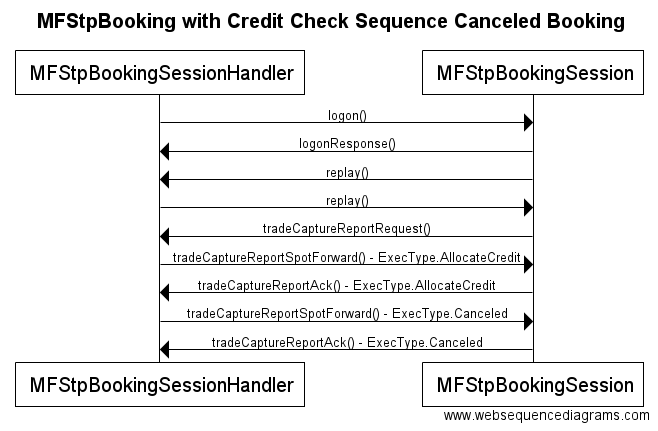
Figure 6.3. – MFStpBookingSession with canceled booking. This shows the normal flow when a trade is canceled instead of being booked.
During both of these flows, each TradeCaptureReportSpotForward message will have a TradeCaptureReportAck message send. The TrdRptStatus field will be set to "Accepted" if it has been successfully processed by Whisperer. However, if the field is set to "Rejected", it means the TradeCaptureReport was not successfully processed and the TradeCaptureReportRejectReason should be inspected. The rejects can happen if the customer exceeds a preset limit or if the TradeCaptureReport message is malformed. If the message is rejected, the credit is not consumed and it is not booked to the back office system.
Overview
Content Tools