Whisperer Enterprise supports all three principle forms of Quotation Negotiation trading:
All quotes are good until replaced, expired or withdrawn. The MFSBE API supports the following four separate mechanisms for the management of tradeable prices by a Maker:
Some Venues allow the Maker to specify whether a given quote is indicative, or tradeable. Depending on the Venue, indicative quotes may be displayed in the trading GUI as non-tradeable ("greyed out"), or may result in the quote being removed from display entirely, as if it has been withdrawn.
Indicative pricing is particularly important when Making to those Venues which offer composite trading grids that all Takers to compare multiple providers at a glance.
Some Venues allow the Maker to specify a finite time that an individual quote is available for. This is essential for one-shot RFQ models (e.g. to support dealer intervention), but may also be used act as a back-stop for ESP and RFS flows to ensure that the price is promptly removed from display, in the event of error scenarios and other edge cases.
Both Quote and MassQuote messages support the provision of an expiry time:
Quote.ValidUntilTimeMassQuote.NoQuoteSets[*].NoQuoteEntries[*].ValidUntilTimeThe default ValidUntilTime value is set far into the future, so this field may be ignored for those customers wishing to adopt a simple model.
For those venues which mandate time-to-live rather than an absolute date/time, WH-E will reference the MFSBE message sendingTime in order to determine the duration.
A quote may be withdrawn entirely. In a trading GUI this will result in the price immediately being removed from display. Quote withdrawal is often an integral part of a RFQ dealer intervention workflow, where the trader may wish to manually reprice, during the life of a 30s quote.
MassQuote messages may be withdrawn via the same mechanism.
In ESP pricing, a quote is rendered indicative by publication of zero quantities against prices for a given rung and side.
In addition, publication of a message without any rungs will effectively result in the complete withdrawal of the previous published ladder.
For Quotes, QuoteType lives in the body level, and refers to the overall Quote Tradeability. Where as MassQuotes, it lives in NoQuoteEntries and it refers to the specific QuoteEntry.
For a single Leg product, where BidPx is populated, but OfferPx is not.
QuoteQuoteType.BidIsTradeable will be set to True. MassQuotesNoQuoteSets[1].NoQuoteEntries[X].QuoteType.BidIsTradeable will be set to True.For Swap, Where the Near Leg OfferPx is populated, and the Far Leg BidPx is populated.
QuoteQuoteType.BidIsTradeable will be set to True. MassQuotesNoQuoteSets[1].NoQuoteEntries[X].QuoteType.OfferIsTradeable will be set to True, and the Far leg NoQuoteSets[2].NoQuoteEntries[X].QuoteType.BidIsTradeable will be set to True.For Blocks, we always set both BidIsTradeable and OfferIsTradeable to True or Both to False.
QuoteQuoteType.BidIsTradeable and QuoteType.OfferIsTradeable will be set to True, regardless of the overall side.MassQuoteX), if is Tradeable, all NoQuoteSets[ALL].NoQuoteEntries[X].QuoteType.BidIsTradeable and NoQuoteSets[ALL].NoQuoteEntries[X].QuoteType.OfferIsTradeable will be set True.NoQuoteSets[ALL].NoQuoteEntries[Y].QuoteType.BidIsTradeable and NoQuoteSets[ALL].NoQuoteEntries[Y].QuoteType.OfferIsTradeable will be set False.In ESP, Makers publish MassQuotes. Each message is a single quote, which should contain a full snapshot of your price ladder for that symbol & price bucket.
The shape and size of their ladder can vary from tick to tick. Each MassQuote completely replaces the previous. You may either publish a QuoteCancel to withdraw a previously published ladder, or publish a new empty MassQuote (zero rungs).
On the venue side, MarketFactory will handle the messages to make sure that the published liquidity matches your MassQuote.
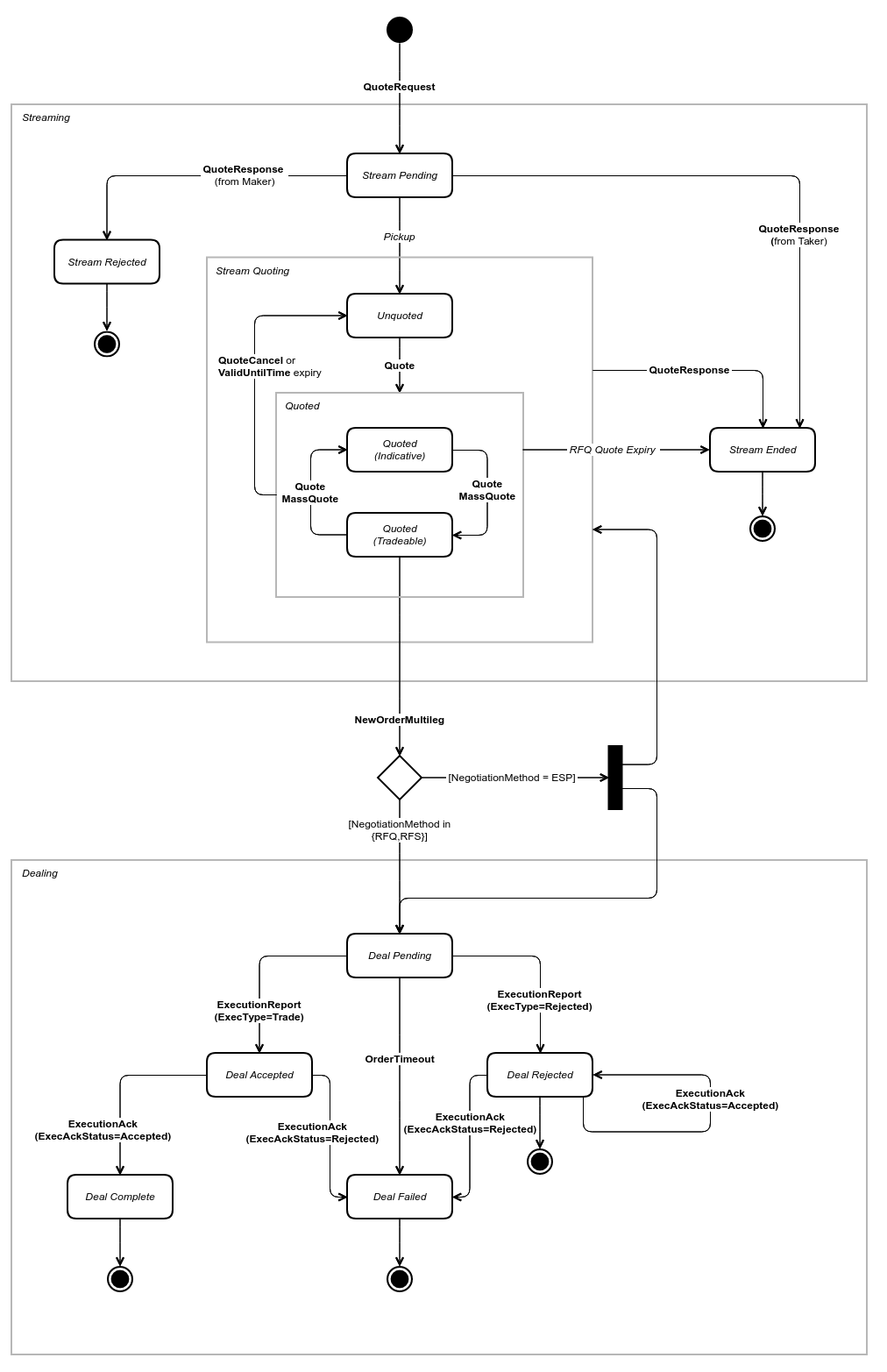
The following State Transition Diagram outlines the model for traditional eCommerce ESP and RFS quotation negotiation workflows for both Maker and Taker clients.
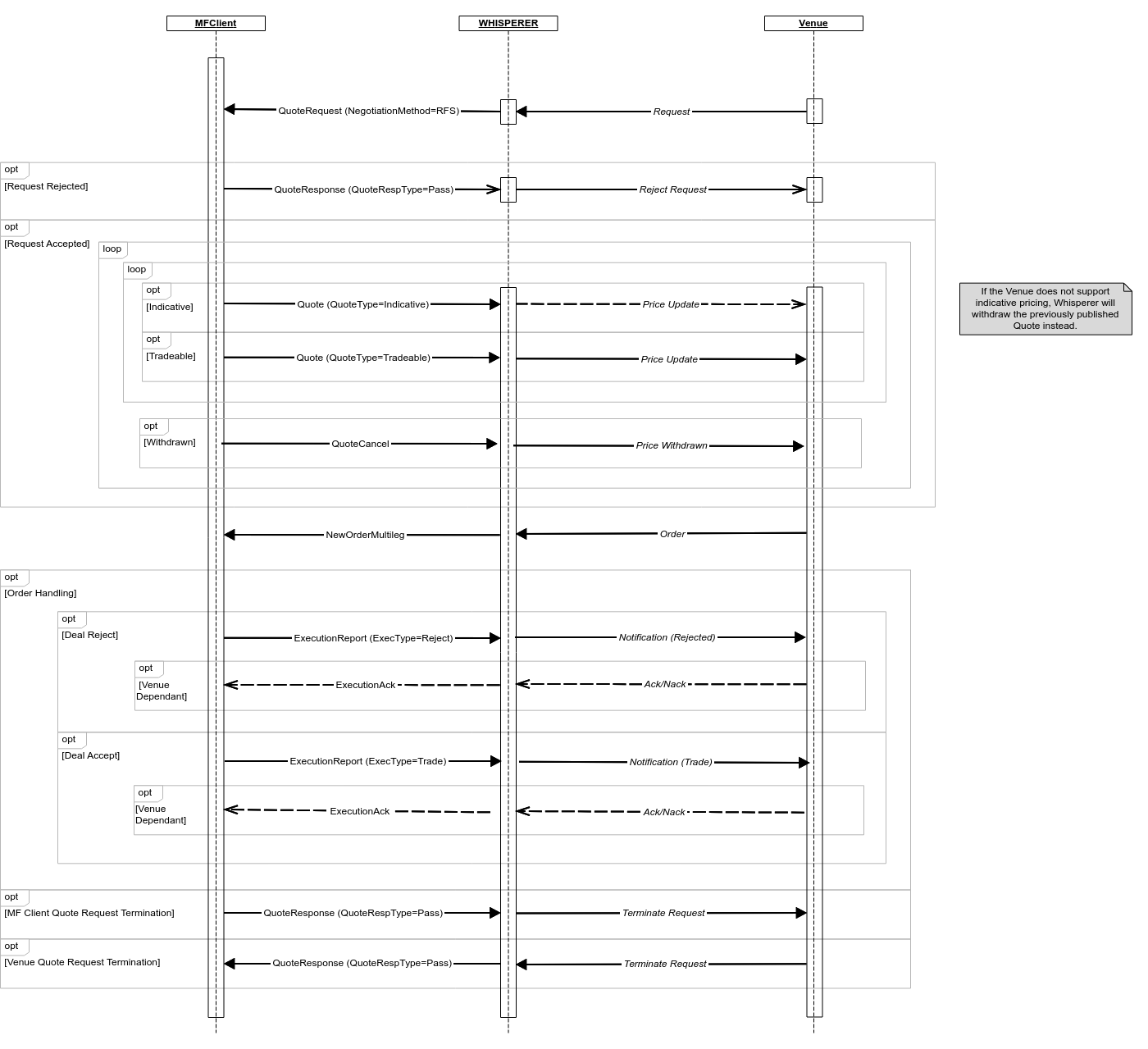
Whilst the Maker and Taker views are essentially symmetric, there are some important differences which are illustrated in the sequence diagrams.
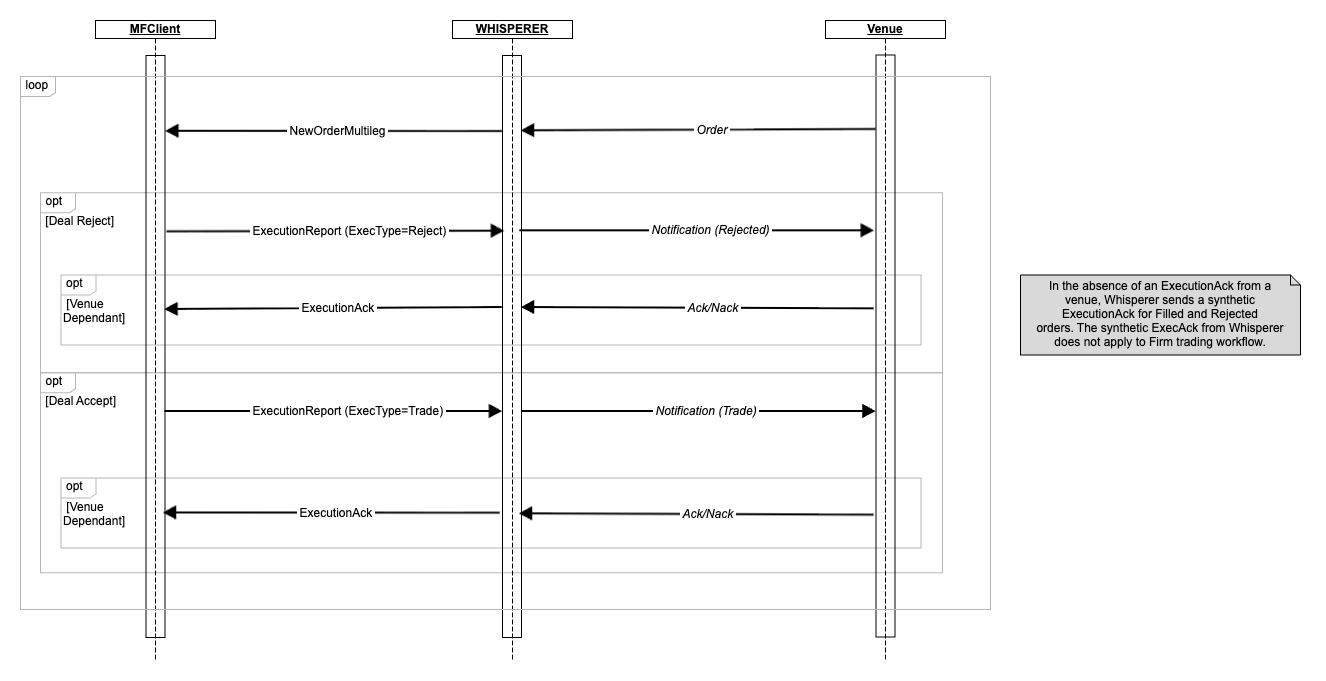
Some Maker venues may support Client acknowledgement of their deal acceptance or rejection. Accordingly, the Client is encouraged to always send an ExecutionAck message to confirm the trade result, where the Venue does not use this mechanism, Whisperer will simply drop the message.
Typically the Venue will send some sort of message Ack-ing or Nack-ing the Maker response to the originating order. Any of the following are possible:
If should be noted that there is a lot of variation how this terminal message is used across the venues:
At present Whisperer does not generate synthetic |
Should the Client receive an |
A request for a single-shot price, delivered as a Quote, with the TTL defined in the ValidUntilTime. Possible Dealer Intervention may deliver other Quote(s) prior to expiry of first. Expiry terminates the workflow.
Each individual Quote is good until replaced, withdrawn or ValidUntilTime expiry.
Whisperer supports two Taker RFS pricing models:
Quote messages.MassQuote messages aggregating the individual Maker Quote messages. This model is Venue dependent - currently offered by t360_tex and fxspotstream only.In this model each QuoteSet represents a different Leg/value date, and each QuoteEntry for a given QuoteSet contains the Leg quote details provided by an individual LP, identified by reference to the "ExecutionVenue" EntryPassthruKey.
QuoteEntries in MassQuote are sorted by best Bid/Offer.
SPT, FWD and NDF are sorted by BidPx/OfferPx.SWP and NDS are sorted by Swap points.BLK and NDB are sorted by SpotRate.If two QuoteEntries have the same price, they will be ordered from Oldest to Newest.
Please also see Price Representation.
In both cases, standard RFS subscription rules apply - the subscription is terminated by a deal request or a pricing duration timeout.
Each individual MassQuote is good until replaced, withdrawn or ValidUntilTime expiry.
Unlike RFS/RFQ, ESP Pricing will continue following any attempt to trade.
MassQuote messages will contain rungs populated according to one of two principle modes:
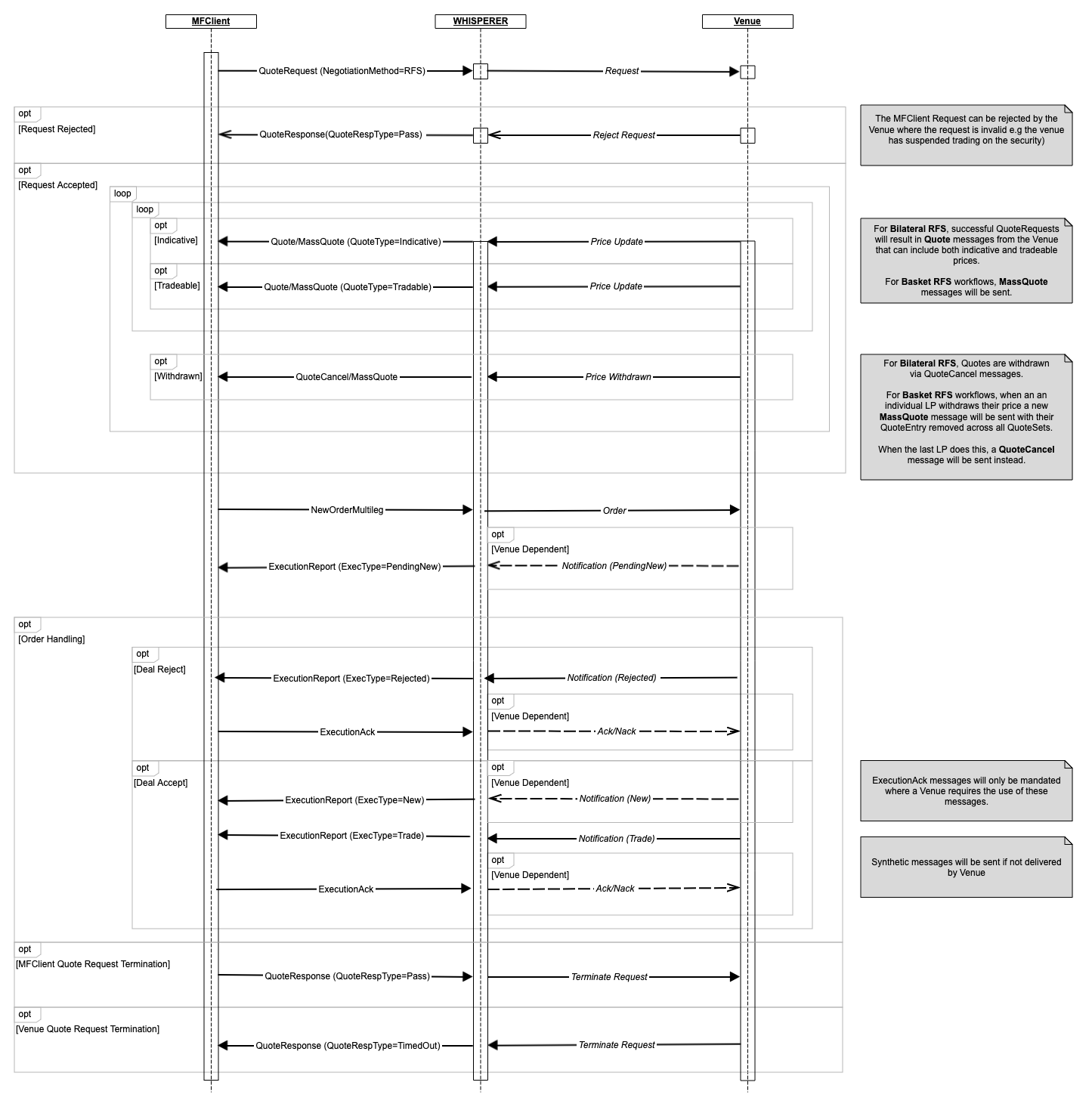
QuoteRequest message NoBodyPassthruFields block.The standard Taker pricing message flow is illustrated in the sequence diagram below:
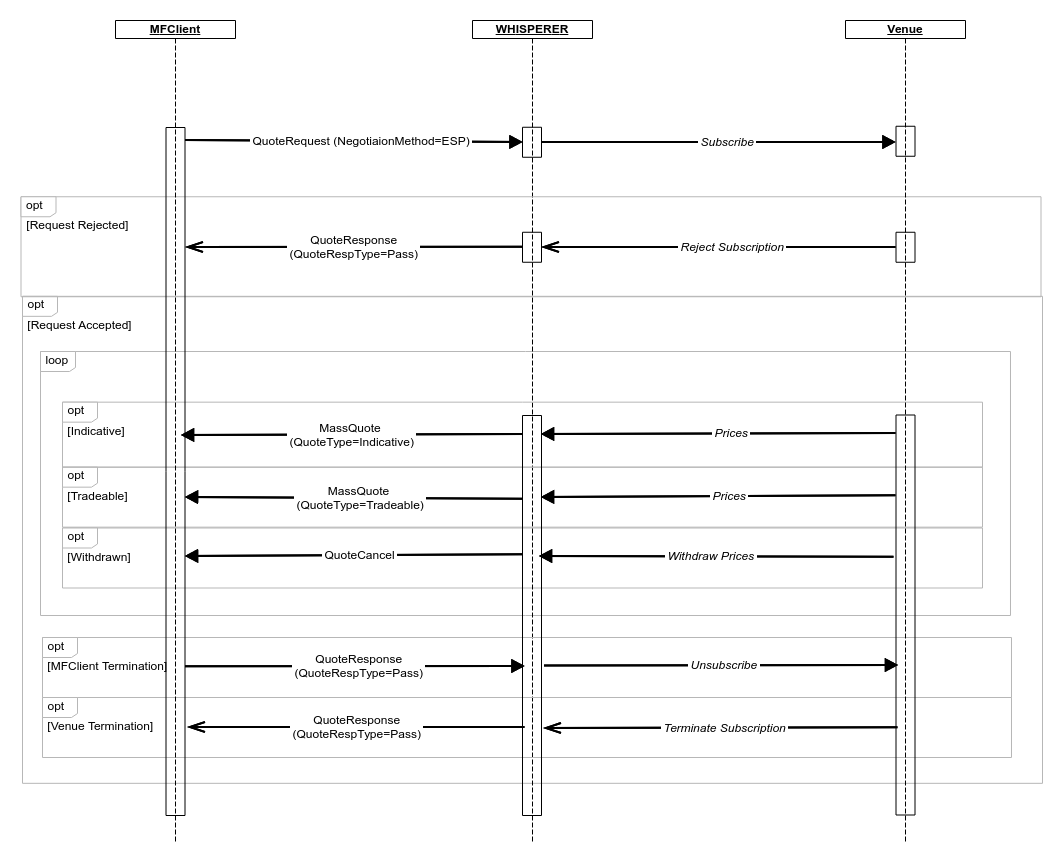
The client will receive an immediate response to an invalid However, the client may not always receive an immediate
A Venue's response actually depends on the instrument being traded, time of day and venue-specific behaviour. The client may wish to implement a timeout mechanism to unsubscribe and then either:
|
The Venue will typically issue multiple requests for each currency pair, one for each configured pricing group (aka "client bucket" etc.).
For a given ccy pair, Whisperer imposes no restrictions on the ladder that you publish, although details of exactly what you publish may well vary from venue to venue.
There are two basic motivations for makers when offering liquidity:
The management of stream categories within and across venues requires, as usual, some careful consideration:
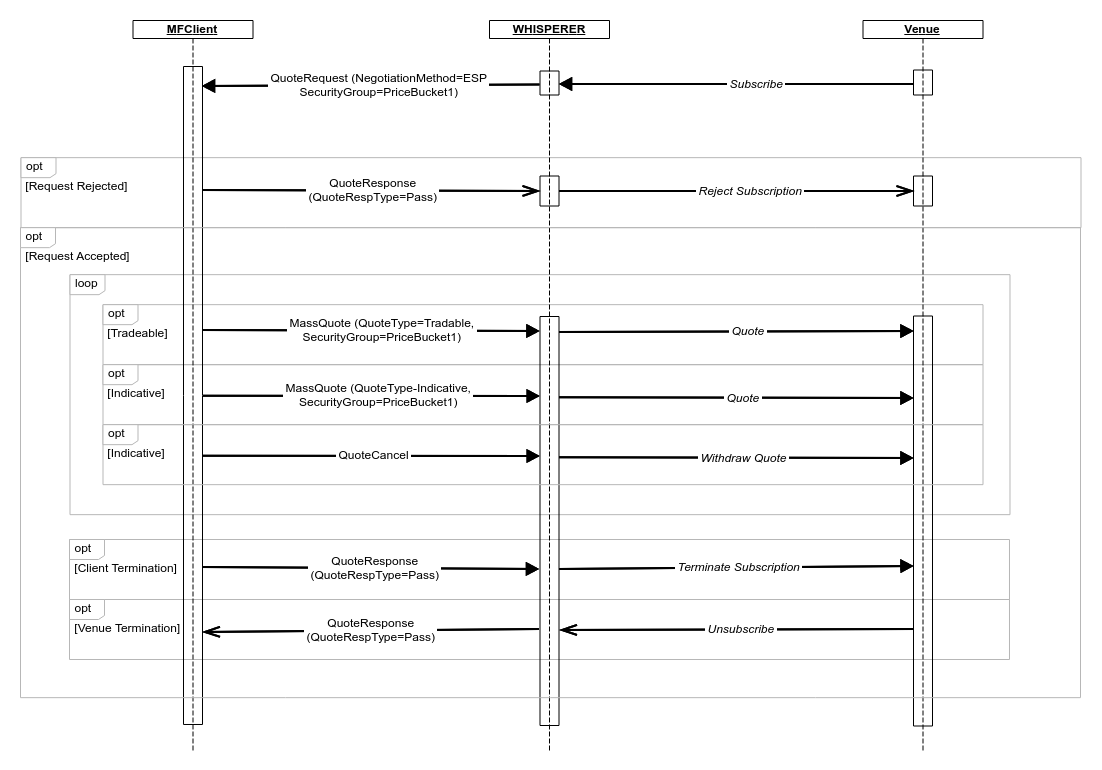
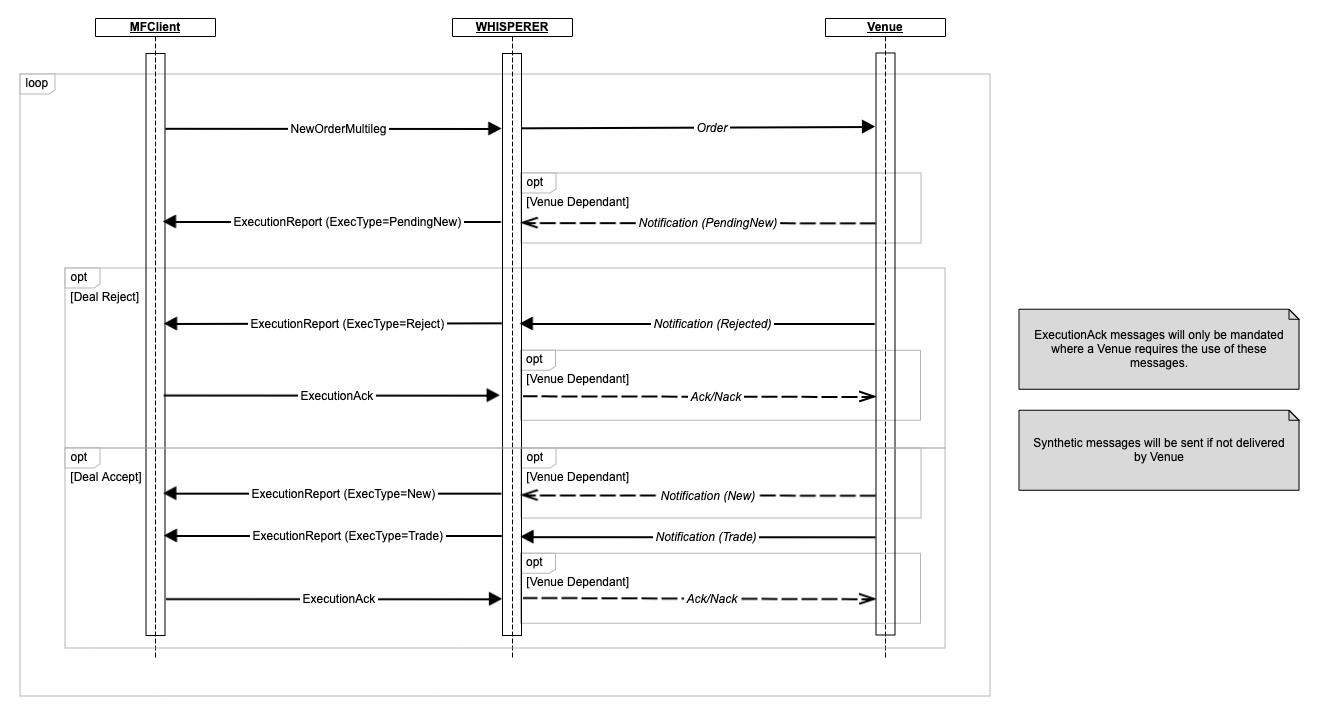
The messages flows documented here illustrate a standard "Last-Look" trading model. "Firm" trading is possible on some Venues and comprises standard MassQuote provision alongside receipt of ExecutionReport messages from the Venue notifying the maker of the fills. |