The Order state transition model is normalised and consistent across all trading workflows, as outlined in the diagram below.
Where Venue events are absent, synthetic equivalents are generated by Whisperer in their place. These messages are easily discernible by reference to the TradingFlags.IsSynthetic field.
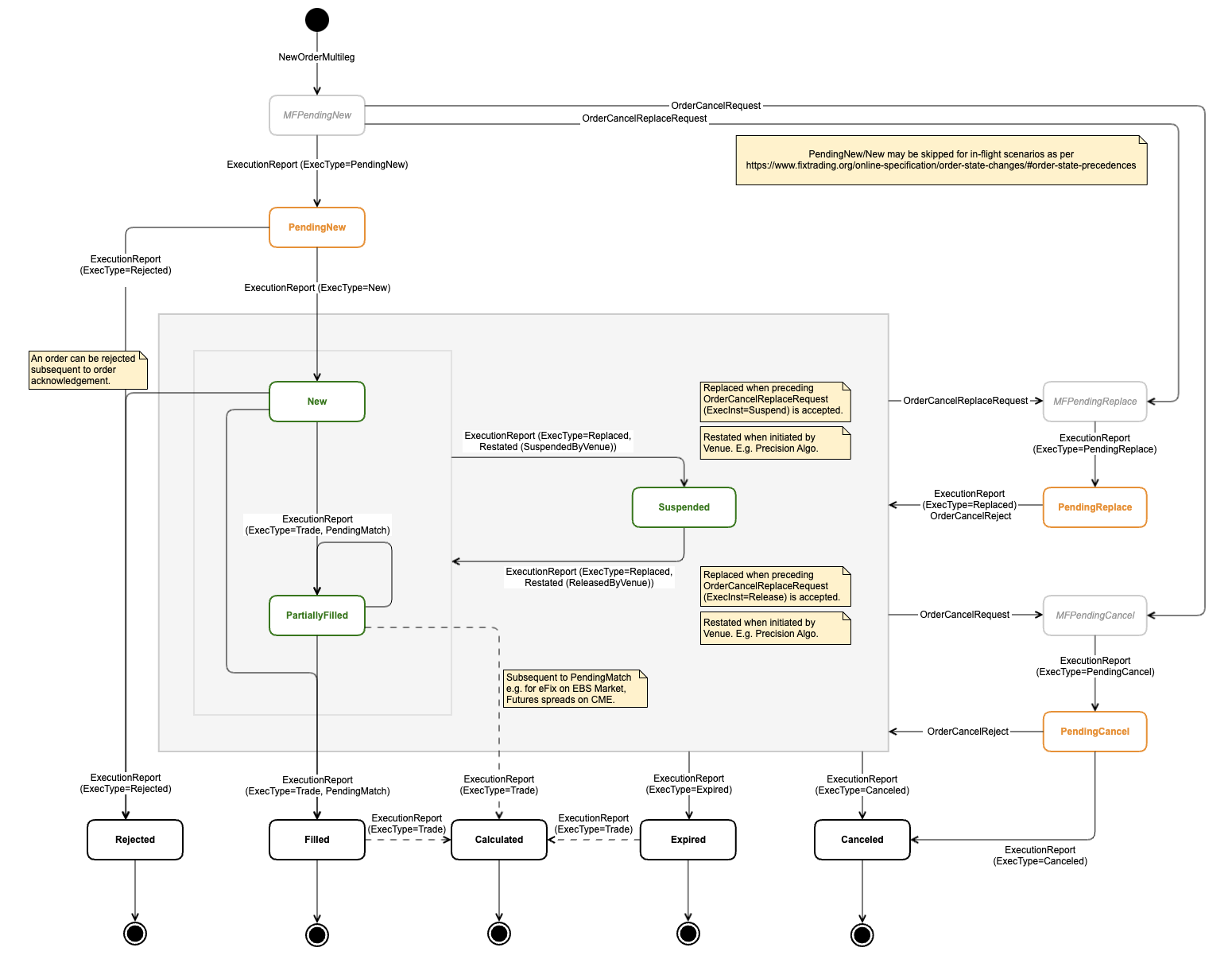
| It's worth remembering that while all inbound messages will adhere to the same state transition model, there will necessarily be Venue-specific variation in whether and how outbound ExecutionAck messages are handled. |
The following table lists the possible OrdStatus and ExecType combinations the Client may receive in Whisperer ExecutionReport messages.
Should MultilegCancelReplaceRequest or OrderCancelRequest messages be rejected by the venue, the current working order status will be reported in the OrdStatus field of the OrderCancelReject message.
| Category | OrdStatus | ExecType | Description |
|---|---|---|---|
| Transitional | PendingNew | PendingNew | Venue acknowledgement of receipt of Order. |
| Active | New | New | Venue notification of acceptance of Order. |
| Replaced | Venue notification of acceptance of a replacement Order (including client-initiated Order release). | ||
| Restated | Venue notification of venue-initiated Order release. | ||
| Active | PartiallyFilled | PendingMatch | Venue notification of a potential match. E.g. EBS eFix. |
| Trade | Venue notification of a done trade. | ||
| Replaced | Venue notification of acceptance of a replacement Order (including client-initiated Order release). Note: Order Suspend/Release should not be combined with other parameter changes. | ||
| Restated | Venue notification of venue-initiated Order release. | ||
| Active | Suspended | Replaced | Venue notification of acceptance of client-initiated Order suspension. NOTE: Note: Order Suspend/Release should not be combined with other parameter changes. |
| Terminal | Filled | PendingMatch | Venue notification of a potential match. E.g. EBS eFix. |
| Trade | Venue notification of a done trade. | ||
| Transitional | PendingCancel | PendingCancel | Venue acknowledgement of receipt of OrderCancelRequest. |
| Terminal | Canceled | Canceled | Venue notification of Order cancellation. |
| Transitional | PendingReplace | PendingReplace | Venue acknowledgement of receipt of OrderCancelReplaceRequest. |
| Terminal | Rejected | Rejected | Venue rejection of order. |
| Terminal | Calculated | Trade | Venue notification of Fixing Order rate confirmations (EBS eFix), and notification of individual legs for spread instruments (CME). |
| Terminal | Expired | Expired | Venue notification of the expiry of specified TimeInForce. |
Orders may be:
Details of the TimeInForce values supported by Whisperer Enterprise for both categories are provided below.
The time in force instruction may optionally be refined by the specification of order activation and expiry times:
| Name | Nature | Description | 59/TimeInForce | 168/EffectiveTime | 126/ExpireTime | 1629/ExposureDuration |
|---|---|---|---|---|---|---|
| Immediate Or Cancel | Aggressive | The Order must be executed immediately, at least in part (Partial fills are allowed), otherwise the Order is cancelled. AKA 'Fill and Kill'. | IOC | Optional | - | - |
| Fill Or Kill | Aggressive | The Order must be executed immediately, in full (no Partial fills), otherwise the Order is cancelled. | FOK | Optional | - | - |
| Good For Auction | Resting | The order is only active when the instrument enters an auction state. At all other times, the order remains inactive. | GFA | Optional | - | - |
| Good For Day | Resting | The Order expires automatically on close of the trading day, if it is still unfilled. | DAY | Optional | - | - |
| Good For Time | Resting | Order is active for a specified duration. | GFT | Optional | - | Mandatory |
| Good 'Til Date | Resting | Order is active until a specified time. | GTD | Optional | Mandatory | - |
| Good 'Til Canceled | Resting | The Order remains active until it is either executed or cancelled. NOTE: Maximum possible duration is one trading week, but is equivalent to DAY for most Venues that reset daily. | GTC | Optional | - | - |
| At Market Open | Resting | The order is only active when the instrument market opens. At all other times, the order remains inactive. It is typically entered when the market is in pre-open state. | AMO | Optional | - | - |
| At Market Close | Resting | The order is only active when the instrument market closes. At all other times, the order remains inactive. It is typically entered when the market is in pre-close state. | AMC | Optional | - | - |
There are three broad categories of order type:
When matched in a CLOB ECN, Limit orders are said to be 'aggressed' by Market orders.
Details of the Order Type values supported by Whisperer Enterprise for all categories are provided below.
| Order Type | Category | Description | 40/OrdType | 44/Price | 99/StopPrice | 210/MaxShow | 110/MinQty | 389/DiscretionOffsetValue | 211/PegOffsetValue |
|---|---|---|---|---|---|---|---|---|---|
| Limit price | Stop price | Iceberg tip size | Added to Bid or subtracted from Offer limit price to specify the allowed slippage for the order. | ||||||
| Market | Market | An instruction to deal immediately at the best possible price (the current rate) OR An instruction to deal during the auction/fixing time at the closing auction/fixing price if sent with TIF=GFA. (eg, eFIX orders on EBS) | Market | - | - | - | - | - | - |
| Dark Market | Market | Equities-specific. | Market | - | - | Zero | Optional | - | - |
| Market Range | Market | AKA "Market With Protection". A market order with specified slippage. | Market | - | - | - | - | Mandatory | - |
| Market To Limit | Market | Order that starts as a Market order and in the event of a partial fill, executes any leaves quantity as a Limit order. | MarketLimit | - | - | - | - | - | - |
| Market If Touched | Market | Market order will be submitted to market when a specified price is reached. Here, StopPrice is used to convey the Trigger price. This value should be better than the market price. | IfTouched | - | Mandatory | - | - | - | - |
| Previously Quoted | Limit | An order to hit an individual quote. To hit multiple quotes, aka sweeping, the user must submit individual orders from best to worst price. | PreviouslyQuoted | Mandatory | - | - | -' | - | - |
| Limit | Limit | AKA "Take Profit". An instruction to deal if a market moves to a more favourable level. Where multiple partial fills are allowed, a Volume Weighted Average Price (VWAP) of the total order quantity may be provided as the limit price. | Limit | Mandatory | - | - | Optional | - | - |
| Dark Limit | Limit | AKA "Hidden Limit", "Ghost", "Sniper". A form of Iceberg, where the market-visible order qty is set to zero. | Limit | Mandatory | - | Zero | Optional | - | - |
| Limit To Market | Limit | Order that starts as a Limit order and in the event of a partial fill, executes any leaves quantity as a Market order. | Funari | Mandatory | - | - | Optional | - | - |
| Limit If Touched | Limit | Limit order will be submitted to market when a specified price is reached | IfTouched | Mandatory | Mandatory | - | Optional | - | - |
| Iceberg | Limit | AKA "Reserve". A limit order that has both displayed and hidden components. | Limit | Mandatory | - | Mandatory | - | - | - |
| Pegged | Limit | An order with an offset to the prevailing market rate. The displayed quantity will float with the market. | Pegged | - | - | Optional | - | - | Mandatory |
| Pegged To Limit | Limit | A Pegged order, but the displayed quantity will only float up to the limit price of the order. | Pegged | Mandatory | - | Optional | - | - | Mandatory |
| Discretion | Limit | AKA "Limit With Protection". A limit order with specified slippage. The market sees only the limit price. | Limit | Mandatory | - | - | - | Mandatory | - |
| Stop | Stop | AKA "Stop Loss". An instruction to deal if a market moves to a less favourable level. | Stop | - | Mandatory | - | - | - | - |
| Trailing Stop | Stop | The Stop Price follows the market by a specified offset. | Stop | - | - | - | - | - | Mandatory |
| Stop Limit | Stop | Executes an exposure-reducing limit order when market exceeds order's price. | StopLimit | Mandatory | Mandatory | - | - | - | - |
| Trailing Stop Limit | Stop | A Stop Limit order where the stop trigger price is at a fixed amount below the market price, based on the user-defined "trailing" amount. The limit order price is also continually recalculated based on the limit offset. | StopLimit | - | - | - | - | Mandatory | Mandatory |
Algo Orders extend on the StandardOrderTypes above and require the specification of additional Venue-specific custom parameters using the HasExtendedOrderFields.NoStrategyParameters repeating group in both NewOrderMultileg and MultilegOrderCancelReplaceRequest.
The Client specifies the name of the algo to be executed by providing the following entry in this repeating group:
StrategyParameterType: 14/StringStrategyParameterName: "TargetStrategy"StrategyParameterValue: "LP-assigned name of desired Algo"Other strategy parameters must be populated as per LP requirements for the specific Algo. The Client will need to reference the venue-provided API documentation for this detail.
A calendar spread is a futures strategy with simultaneous long and short positions on the same underlying asset but with different expiry dates.
Whisperer currently only supports Bull Calendar Spreads which are defined with Buy near and Sell far legs.
Side: The LegSide of the first Leg on the client message to Whisperer will represent the Side of the Spread.
Leg1 | Leg2 | Action on Spread |
|---|---|---|
Buy | Sell | Buys the spread - buys leg1, sells leg2 |
Sell | Buy | Sells the spread - sells leg1, buys leg2 |
Price: The Price on the order will be the spread price. The LegPrice must not be populated on the request.
The following ExecutionReport messages are published for Fills:
The Notional fill and Leg fills for a given trade will all have the same SecondaryExecID
The legs on Notional fill will have the overall Notional fill information with
OrdStatus: CalculatedExecType: Calculated