This page sets out details of how the Gateway initiates or terminates connectivity with the target Venue. The Client initiates this behaviour via UserRequest messages.
Whisperer is solely responsible for the management and correct handling of Venue-side FIX Session Synchronisation, including the necessary logic relating to End of Day Resets etc.
Venue Logon
Session startup behaviour is standardised across Taker, Maker and CLOB Venue types as follows:
- The Client first establishes connection to the Gateway with Logon & LogonResponse,
- The Client then instructs the Gateway to establish a connection to the Venue via a UserRequest (UserRequestType=LogOnUser) message.
- The Gateway will attempt to establish connectivity to the Venue
- Once connectivity is established, FIX Session-level messages are exchanged as necessary to address any synchronisation issues.
- The Gateway then notifies the client of a successful connection via a UserNotification (UserStatus=LoggedOn) message.
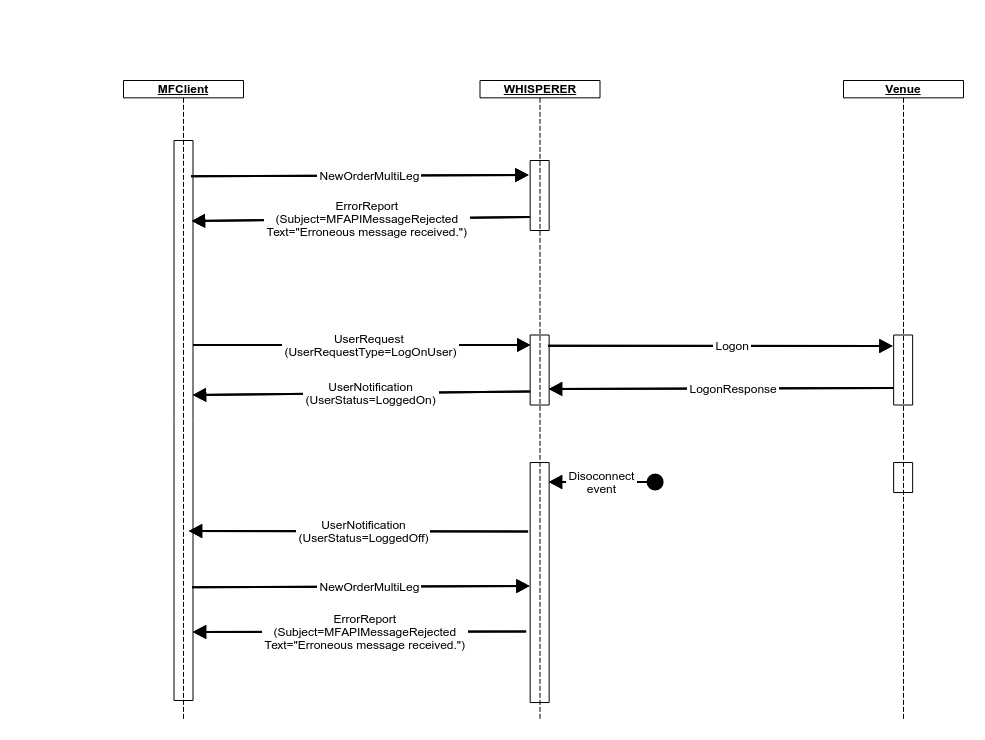
- Any Client pricing/trading requests sent before this will be rejected by Whisperer via ErrorReport messages.
FIX Session Reset
For those Venues which reset FIX sessions on a weekly basis, no special action is required, as this matches the Gateway schedule described above.
For persisted (non-Pricing) session types where Venues reset FIX sessions on a daily basis, the Gateway will apply the necessary reset logic for the first successful FIX Session Logon only, at Start of Day.
For non-persisted Pricing sessions, the Gateway will typically reset the session on every FIX Session Logon.
FIX Session Establishment
Once instructed to do so by the Client User, the Gateway will attempt to logon to the Venue. Should a connection not be established immediately, it will periodically retry as follows:
- On each failed logon attempt the Gateway will:
- First issue an ErrorReport(Subject= VenueLogonError, Text="Venue Logon failed, waiting <RetryInterval>s before retry."), then
- wait RetryInterval seconds (> 0), and repeat.
- Once MaxAttempts (> 0) failed logons occur in a row, the Gateway will:
- First issue an ErrorReport(Subject= VenueLogonError, Text="Venue Logon failed, waiting <BackoffInterval>s before retry."), then
- wait BackoffInterval seconds (>= 0) and restart the cycle.
This behaviour applies across all Gateways, irrespective of line protocol, Maker/Taker perspective, or trading model.
MarketFactory will apply appropriate values to each of these three properties, based on individual Venue requirements. No Customer involvement is required.
Should the Client User wish to instruct the Gateway to cease attempting to connect to the Venue at any time during this cycle, then it may issue a UserRequest (UserRequestType=LogOffUser) message.
Venue Connection - FIX Session Synchronisation
In order to ensure that Venue-side session synchronisation issues are avoided, Whisperer implements the following policy:
Gateway Detection of Venue Sequence Number Gaps
Non-recoverable Inbound seqNum Gaps
If the incoming message has a sequence number less than expected and the PossDupFlag is not set, then a serious error has occurred. In this scenario, the Gateway will issue a UserNotification(UserStatus=LoggedOff, Text="Session synchronization failure.").
In this event, the Customer should contact MF Support in order to confirm any necessary corrective action.
Recoverable Inbound seqNum Gaps
If a recoverable sequence number gap is detected on receipt of the Venue's logon response, then the Gateway will:
- First issue an ErrorReport(Subject= VenueSeqNumError, Text="Issuing ResendRequest."), then
- a ResendRequest will be issued.
Whilst a sequence gap exists, no other Venue messages will be processed until the sequence gap is resolved - via SequenceResetGapFill(s) and message resends, as the Venue deems necessary.
Once the sequence gap is resolved, Whisperer will formally Logout from the Venue and then re-Logon. Standard Logon processing will thus only progress when complete, clean session synchronisation is guaranteed.
As a final verification, the Gateway will issue a TestRequest against the Venue; receipt of the Heartbeat response triggers Whisperer to notify the Client of successful session establishment via the UserNotification(UserStatus=LoggedOn).
The Client User must therefore be capable of receiving and processing re-sent Venue messages relating to it's previous session (marked as PossResend) in the interval between the UserRequest and the UserNotification.
Venue Detection of Gateway Sequence Number Gaps
Non-recoverable Outbound seqNum Gaps
If the Gateway's outgoing Logon message has a lower than expected sequence number from the Venue's perspective, then a serious error has occurred. In this scenario, the Venue will terminate the session and the Gateway will issue a UserNotification(UserStatus=LoggedOff, Text="<Message provided by Venue>").
In this event, the Customer should contact MF Support in order to confirm any necessary corrective action.
Recoverable Outbound seqNum Gaps
If the sequence number associated with Venue Logon message issued by the Gateway indicates a recoverable gap, then the Venue will typically respond with a Logon response, followed by a ResendRequest.
Whisperer will respond to this as follows:
- First issue an ErrorReport(Subject= VenueSeqNumError, Text="Received ResendRequest."), then
- The gap will then be resolved via SequenceResetGapFill(s) and/or message resends, as mandated by the Venue message persistence requirements.
- Immediately after resolution of the sequence gap, Whisperer will formally Logout from the Venue and then re-Logon.
- As a final verification, the Gateway will issue a TestRequest against the Venue; receipt of the Heartbeat response triggers Whisperer to notify the Client of successful session establishment via the UserNotification(UserStatus=LoggedOn).
Client Session Synchronisation
Any Client User messages that were delivered to the Gateway during Client Session synchronisation will be assigned message sequence numbers that follow sequentially from the end of the previous session. delivered to the Venue immediately on successful completion of the standard FIX Session Synchronisation.
This is not technically a FIX session synchronisation event and whilst the PossDupFlag will be set to mark it as a resend, the sequence number used will be new.
The Venue may possibly respond with a Reject or BusinessMessageReject, in which case the User will receive an ErrorReport as notification.
Venue Logoff
Venue logoff may be initiated as a result of any of the following:
- A request from the Client via UserRequest (UserRequestType=LogOffUser).
- The Venue initiates a Logout (e.g. End of Day).
- Whisperer detects a dropped connection (e.g. Network failure, Venue-initiated session termination).
- Whisperer shutdown
In all scenarios, the Client is notified of the event via UserNotification (UserStatus=LoggedOff).
Whatever the reason, once logged off, it is the Client's responsibility to initiate a new connection via UserRequest (UserRequestType=LogOnUser).
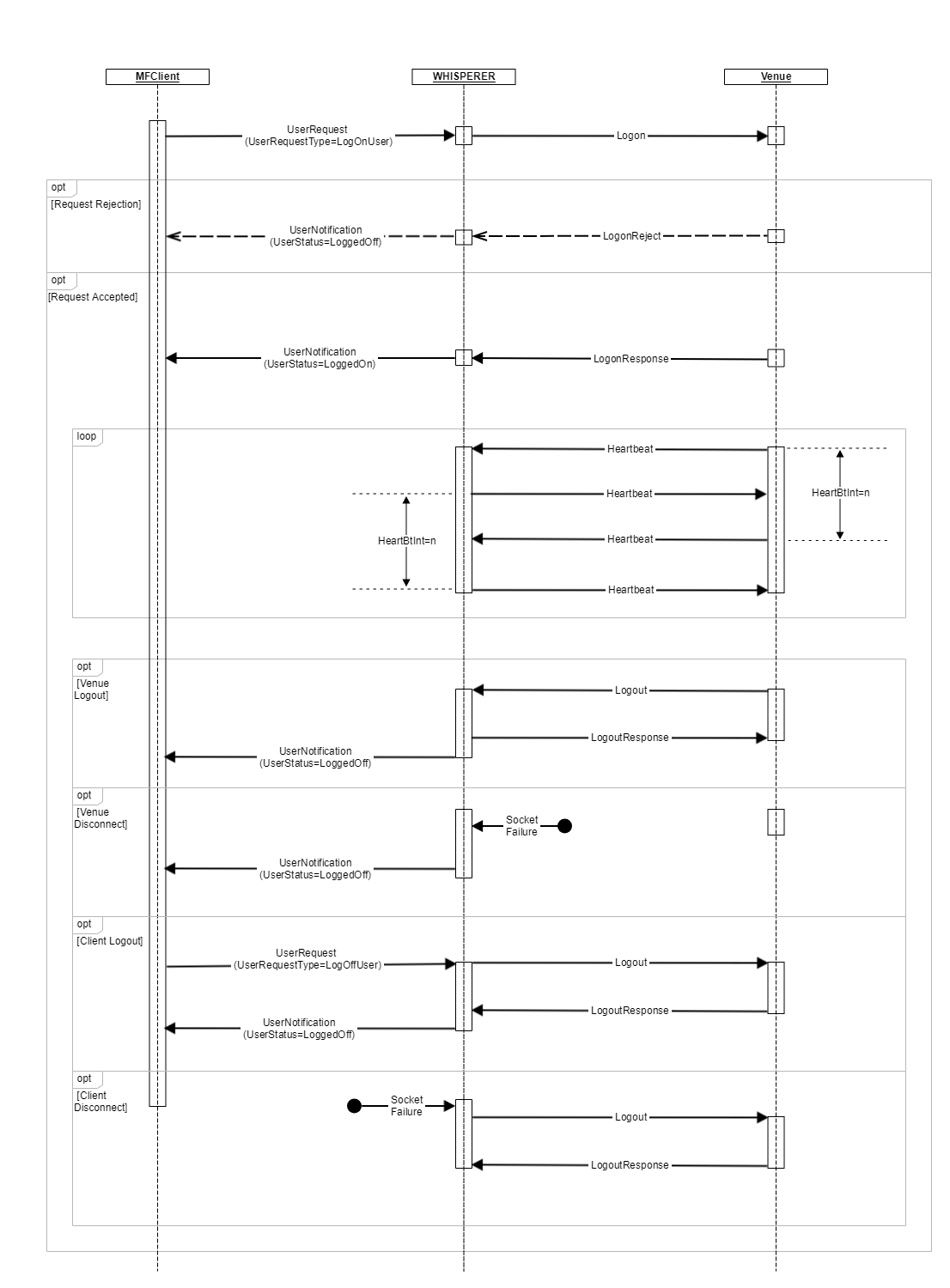
The client should not attempt to send venue messages when they do not have an active venue session open.
Prior to the establishment of the venue session, or after it is terminated, any business messages sent by the client will be rejected with an ErrorReport.
Overview
Content Tools