Page History
| Table of Contents |
|---|
Bloomberg Functions
- FXQT - Access the Bloomberg Beta environment.
- FXPV - Maker function to configure deal-code(s) and clients for ESP and RFS.
- FXAT - Audit Trail.
- FXPF - In order to test RFQ BRL split settlement., untick "Non-deliverable Strict Mode" if you wish to support and test On/Off-shore trading. Under the general tab select "Flexible Spot Out to SPOT" and "Allow Split Settlement". NOTE: This is a specialized and custom setup, with only a handful of regional Brazilian banks supporting it for LATAM clients trading USD/BRL onshore.
- FXTB - FX Trade Blotter
- FXTG - FX trading Grid (ESP)
- BGPI/ENFB - Bloomberg Global Person Identifier administration screens. The Maker manages the necessary MiFID EDM/IDM "Natural Person" values here. NOTE: Algo IDs are maintained by Bloomberg.
- APOD - User/Terminal Administration.
- FXBM - FX Batch Manager. Taker function for Batch/Block trading.
- FXEM - FX Execution Manager. Taker function, also used for Batch trading.
- FX - FX Information Portal.
CDR – provides a detailed set of Holiday calendars by currency.
UUF - Change login password.
- EC - Enterprise Console, used to maintan TLS Certs for FIX sessions. Typically, MarketFactory will use use this on behalf of our Clients. If this should not work, use https://console.bloomberg.com/#/firm/ODkyODQ3/creg-tls-ui/fix-tls-mgr
- HELP <XXX> - opens Bloomberg Help page for a given function, e.g. HELP FXGO
Web Admin
https://service.bloomberg.com/portal/welcome - Used to administer contracts renewals etc.
Functionality
RFS
- Spot transactions are conducted in XOFF environment only
- BMTF, BTFE and BSEF environments must be specifically enabled by Bloomberg
- BMTF and BTFE environments are used for MTF and EMIR regulatory trades
- NDF and NDS may be traded in BSEF environment only
- Algo ID must be provided by Bloomberg; Short Code ID(s) may be created by Bloomberg users via BGPI function
- Components marked in Spec, which tied to specific environments must be used only for those environments. For example, components required for SEF must be used in BSEF only.
- Commodities - regulatory fields N/A
- CASH - presently not supported; Depo-related fields N/A
- Split Settlement requires special setup from Bloomberg; Tag 22432 - SettlQualifier - is used only for Split Settlement transactions
- A client may either cancel a previously submitted quote, or mark a quote as indicative. In either case, the result will be that Bloomberg remove the previous quote from the GUI.
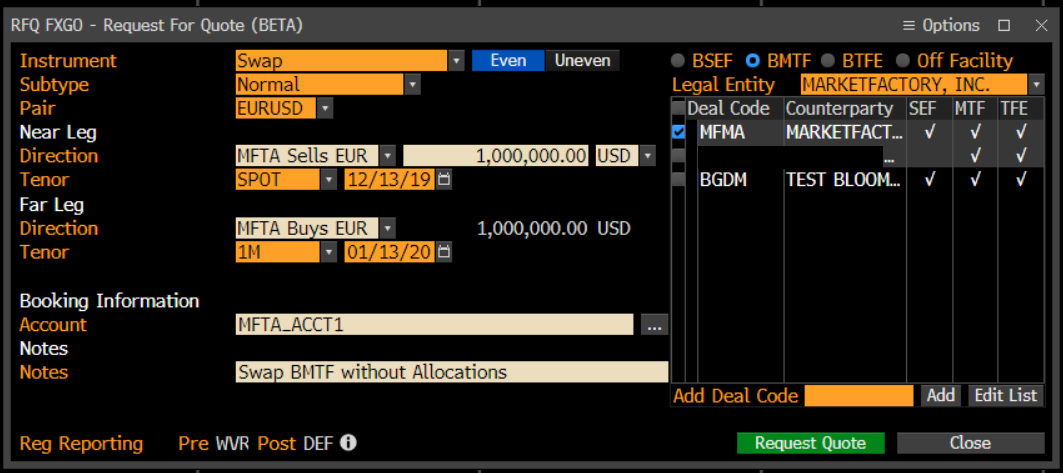
- "Reg Reporting" and "Pre WVR Post DEF" fields are available only when BMTF or BTFE environments chosen
- Improperly built messages will result in either error reports from Bloomberg or won't be processed
- Some fields are required for 2-legged transactions only
- Bloomberg ID Source is the same for both Regulatory Trade IDs and Allocation Regulatory Trade IDs
- BRL is deliverable onshore.
BRL Split Settlement
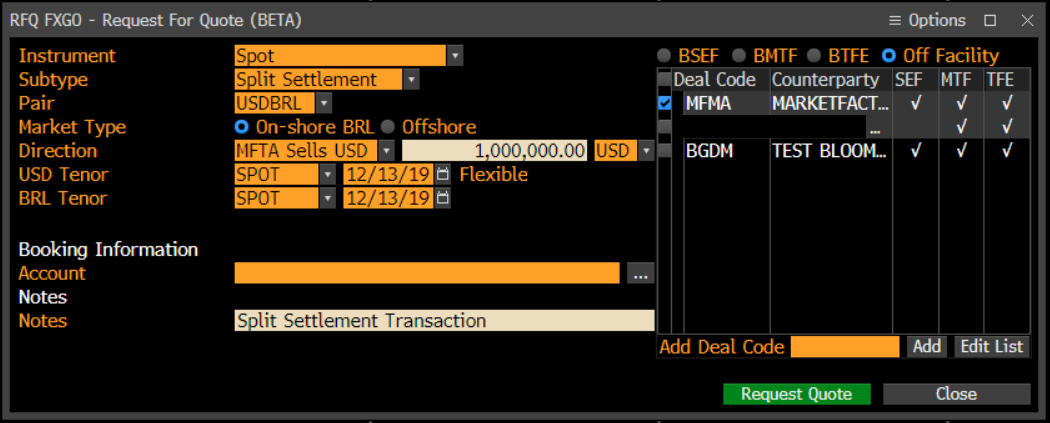
Split settlement allows the client to specify different settlement dates/tenors for each currency in the trade.
- Available only for Spot transactions in XOFF environment
- Available in RFS mode only
- A client must be specifically enabled for Split Settlement by Bloomberg
- Applicable only to specific currency pairs, like USD/BRL
- An enabled client can launch his RFQ FXGO icon and select "Subtype" as "Split Settlement"
- Then a client can change change base currency Settlement Date, which has "Flexible" label to the right, as on the screenshot below
Batches
- Commodities (metals) - traded in XOFF only, regulatory fields N/A
- Only Spot, Outright and NDF LegProductTypes are allowed. Two-legged Swap and NDS securities are split into Spot, Outright and NDF products, respectively
- Environment is the same for all products within a batch.
- Batch contains products for one currency pair only. If another pair is used, a new batch will be created automatically. Moreover, a change of settlement currency will also result in new batch.
- Every product in a Batch can be priced as either Buy or Sell, but never both, unlike RFS, where two-way pricing is available.
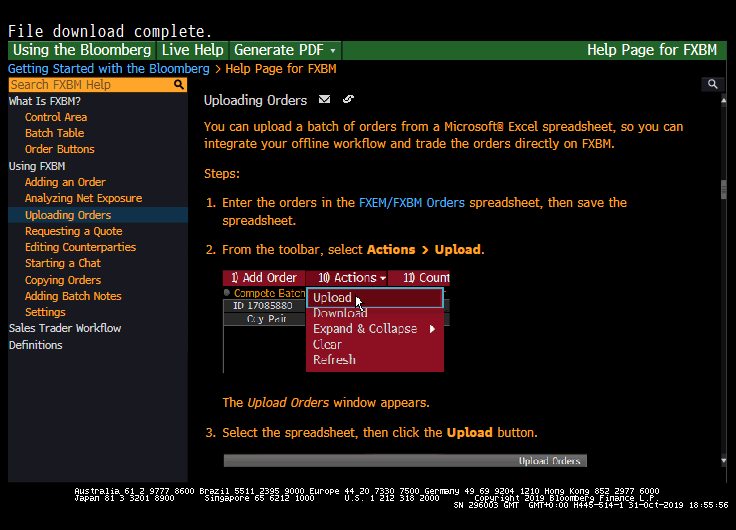
- Its possible to upload Batches from Excel. The steps are:
1) Run HELP FXBM<GO> on Bloomberg Terminal
2) Select "Uploading Orders" option in the left column
3) Download the template spreadsheet by clicking on "FXEM/FXBM Orders" blue link, as per the screenshot below
4) Enter the necessary information into the spreadsheet, template "C.UPLOADING A BATCH INTO FXEM"
5) Drag and Drop this template into your FXBT screen.
ESP
The Trading Grid is used by Takers for ESP pricing and trading against configured Makers.
...
| Note |
|---|
| NOTE: For each defined currency pair, a maximum of one price class can be assigned for automatic SOD subscription. For all the other price classes, subscriptions for that currency pair are managed on a lazy-loading on-demand basis. |
Price Precision
Note that for certain currency pairs, Bloomberg is not able to support decimalised pricing - for example, USD/MXN, USD/ZAR. Alternatively it may be that the Maker maintains a Price Class for whole-pip pricing.
| Warning | ||
|---|---|---|
| ||
| In either case, should the Maker deliver a decimalised price for such pairs, Bloomberg will round 1/2-DOWN on both sides (Bid *and* Offer) – leading to problems. |
Production Support
FXAT - Audit Trail
It is recommended that Maker Support teams utilise the FXAT function within Bloomberg, which provides a highly detailed audit trail of all trading activity.
Rejection of Quote Requests
Whenever Liquidity Provider rejects a request for quote(s) in Bloomberg RFS, ESP or Batches mode, contact email for e-FX support team must be provided in text field.
PartyIDs
| Expand | |||||||||||||||||||||||||||||||||||||||
|---|---|---|---|---|---|---|---|---|---|---|---|---|---|---|---|---|---|---|---|---|---|---|---|---|---|---|---|---|---|---|---|---|---|---|---|---|---|---|---|
|
Please refer to Whisperer Enterprise - PartyIDs for the full Enterprise table across all venues.
Regulatory Fields
| Expand | |||||||||||||||||||||||||||||||||||||||
|---|---|---|---|---|---|---|---|---|---|---|---|---|---|---|---|---|---|---|---|---|---|---|---|---|---|---|---|---|---|---|---|---|---|---|---|---|---|---|---|
|
Please refer to or Regulatory Fields for the full Enterprise table across all venues.
Passthru Fields
| Expand | |||||||||||||||||||||||||||||||||||||||
|---|---|---|---|---|---|---|---|---|---|---|---|---|---|---|---|---|---|---|---|---|---|---|---|---|---|---|---|---|---|---|---|---|---|---|---|---|---|---|---|
|
...
Overview
Content Tools