Page History
...
- Available only for Spot transactions in XOFF environment
- Available in RFS mode only
- A client must be specifically enabled for Split Settlement by Bloomberg
- Applicable only to specific currency pairs, like USD/BRL
- An enabled client can launch his RFQ FXGO icon and select "Subtype" as "Split Settlement"
- Then a client can change change base currency Settlement Date, which has "Flexible" label to the right, as on the screen shot screenshot below
BRL is deliverable onshore.
...
- Commodities (metals) - traded in XOFF only, regulatory fields N/A
- Only Spot, Outright and NDF LegProductTypes are allowed. Two-legged Swap and NDS securities are split into Spot, Outright and NDF products, respectively
- Environment is the same for all products within a batch.
- Batch contains products for one currency pair only. If another pair is used, a new batch will be created automatically. Moreover, a change of settlement currency will also result in new batch.
- Every product in a Batch can be priced as either Buy or Sell, but never both, unlike RFS, where two-way pricing is available.
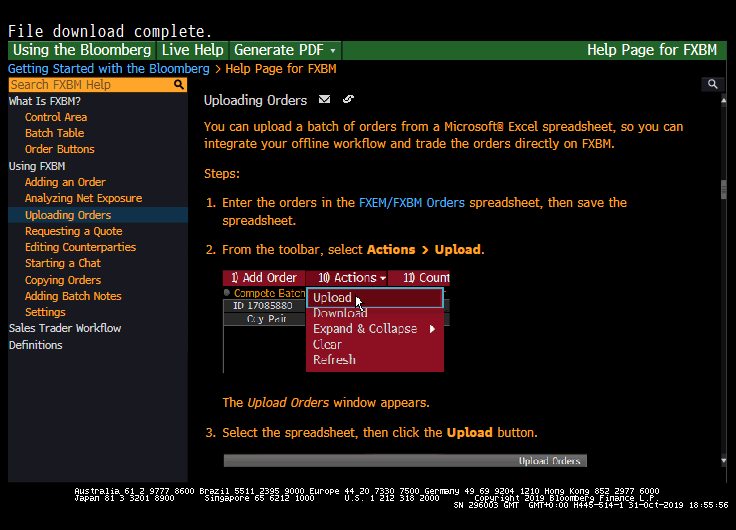
- Its possible to upload Batches from Excel. The steps are:
1) Run HELP FXBM<GO> on Bloomberg Terminal
2) Select "Uploading Orders" option in the left column
3) Download the template spreadsheet by clicking on "FXEM/FXBM Orders" blue link - please see , as per the screenshot below
4) Enter the necessary information into the spreadsheet, template "C.UPLOADING A BATCH INTO FXEM"
5) Drag and Drop this template into your FXBT screen.
ESP
The Trading Grid is used by Takers for ESP pricing and trading against configured Makers.
...
Overview
Content Tools