Page History
Each subscription (for both market data and trading) is always acknowledged with a SubscriptionEventMess
message SubscriptionEventMessage message sent from the Whisperer.
SubscriptionEventMessage messages are received asynchronously via the onSubscriptionEvent() callback on the handler interface. The Customer Application should expect to receive an ac- knowledgement acknowledgement for each subscription request it makes.Main Thread MFHandler MFClient
«create»
«create»
.connect() APIResult
.run()
.onStart()
.subscribeMD(feedID, marketID)
.onSubscriptionEvent(status=ENABLED)
Figure 8.7. – Successful market data subscription.
SubscriptionEventMessage messages can convey three possible subscription states, based on the value of the status field:
• where Where status is set to ENABLED, meaning that the Customer Application's subscription request was successful.
• where Where status is set to DISABLED, meaning that the Customer Application's subscription is no longer active. This can result only from the Customer Application un-subscribing from the Feed / Market.
• where Where status is set to ERROR, meaning that an error occured occurred and the subscription is no longer active. The error is indicated in the reason field of the SubscriptionEventMessage.
The following is an example of the sequence of messages where a Customer Application subscribes to market data:
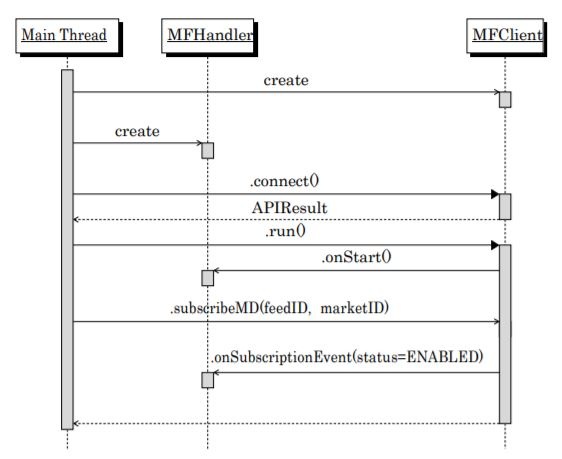
Figure 8.7. – Successful market data subscription.
The following is an example of the sequence of messages where a Customer Application unsuc- cessfully unsuccessfully subscribes to trading:
SubscriptionEventMessage messages where status is set to ERROR are triggered when the Whisperer server loses a connection to a Trading Venue. All subscriptions to the affected Trading Venue are disabled. (For example, certain Trading Venues close temporarily at the end of their (For example, certain Trading Venues close temporarily at the end of their trading day.This would trigger the generation of a SubscriptionEventMessage message with the status field set to ERROR.
If a Customer Application receives a SubscriptionEventMessage message with the status field set to ERROR then it must resubscribe to the affected Feed / Market combinations – this holds both for market data and trading subscriptions.
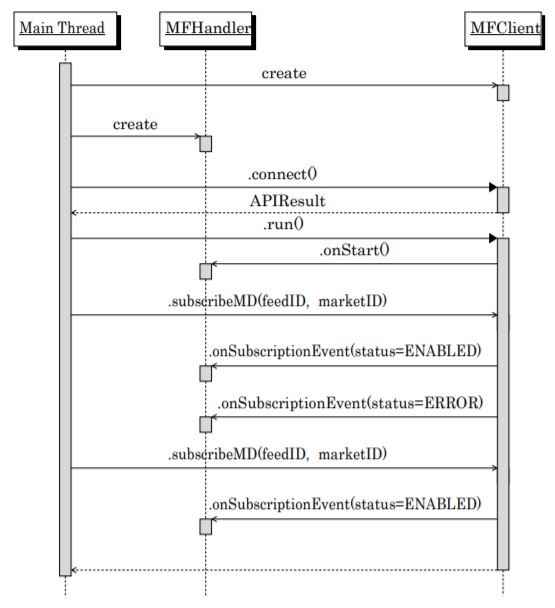
The following is an example of the sequence of messages where a Customer Application’s market data subscription becomes temporarily disabled, and it must resubscribe: The Customer Application can configure its own resubscription logic or it can use Sticky Subscriptions, described in the next section. (It is important to note that if custom resubscription logic is implemented, the resubscription attempts should be configured to at least 30-second intervals.) 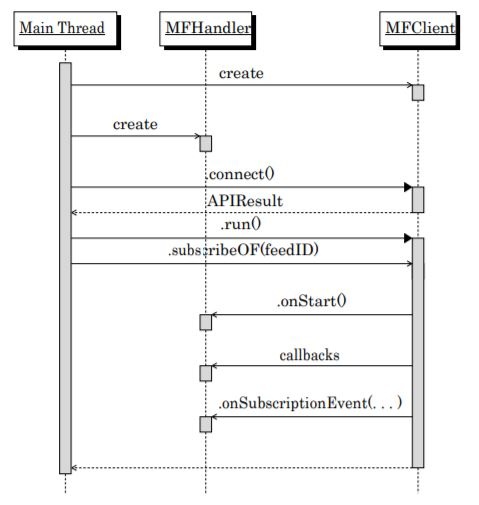 their
their
Main Thread MFHandler MFClient
«create»
«create»
.connect() APIResult
.run()
.subscribeOF(feedID)
.onStart()
callbacks
.onSubscriptionEvent(. . . )
Figure 8.8. – Unsucccessful Unsuccessful trading subscription.The SubscriptionEventMessage passed to
.onSubscriptionEvent() would have the status field set to ERROR, and the reason field the venue message, for example, "Trading not allowed, please contact prime broker."Main Thread MFHandler MFClient
«create»
«create»
.connect() APIResult
.run()
.onStart()
.subscribeMD(feedID, marketID)
.onSubscriptionEvent(status=ENABLED)
.onSubscriptionEvent(status=ERROR)
.subscribeMD(feedID, marketID)
.onSubscriptionEvent(status=ENABLED)
Figure 8.9. – Temporarily disabled market data subscription.
trading
Trading day. ; This would trigger the generation of a SubscriptionEventMessage message with the status field set to ERROR
If a Customer Application receives a SubscriptionEventMessage message with the status field set to ERROR then it must re-subscribe to the affected Feed / Market combinations – this holds both for market data and trading subscriptions..
The following is an example of the sequence of messages where a Customer Application's market data subscription becomes temporarily disabled, and it must re-subscribe:
The Customer Application can configure its own re-subscription logic or it can use Sticky Subscriptions, described in the next section. (It is important to note that if custom re-subscription logic is implemented, the re-subscription attempts should be configured to at least 30 second intervals.)
Overview
Content Tools