Page History
...
| Tip | ||
|---|---|---|
| ||
Certification is completed for the following Venues, please contact MarketFactory if you wish to use Fidessa to trade on other venues:
Known to work for the following venues
|
Workflow
CLOB Orders.
Venues
The target venue for orders submitted via Fidessa is specified in the PartyRole/ExecutionVenue field as a MIC:
...
Exchange
...
XMIC
...
ICE Futures US
...
IFUS
...
ICE Futures Europe (Liffe)
...
IFEU
...
ICE Futures London
...
IFLL
...
London Metal Exchange
...
XLME
...
Supported Instruments
The following Order Types are certified with Fidessa:
...
Good For Day (DAY)
Good Till Cancelled (GTC)
Immediate Or Cancel (IOC)
Fill or Kill (FOK)
Good Until Date (GTD)
...
Good For Day (DAY)
Good Till Cancelled (GTC)
Immediate Or Cancel (IOC)
...
Good For Day (DAY)
Good Till Cancelled (GTC)
...
Good For Day (DAY)
Good Till Cancelled (GTC)
Good Until Date (GTD)
...
Good For Day (DAY)
Good Till Cancelled (GTC)
...
OrdType = Limit +
HasExtendedOrderFields/MaxShow
...
Good For Day (DAY)
Good Till Cancelled (GTC)
...
Supported Instruments
| Expand | |||||||||||||||||||||||||||||||||||||||||||||||||||||||||||||||
|---|---|---|---|---|---|---|---|---|---|---|---|---|---|---|---|---|---|---|---|---|---|---|---|---|---|---|---|---|---|---|---|---|---|---|---|---|---|---|---|---|---|---|---|---|---|---|---|---|---|---|---|---|---|---|---|---|---|---|---|---|---|---|---|
|
Please refer to Supported Instruments to view across all venues.
Symbology
LME
The LME product contract code that represents metal or contract. The first 2 characters represent the Venue Product Code, The 3rd character represents the currency.
Example :

LME publishes Tradable Instrument File as per the documentation https://www.lme.com/-/media/Files/About/Regulation/Mifid-ii/Tradeable-Instrument-File-(TIF)-Specification-v1,-d-,11.pdf.
ICE
ICE Product Codes are available at https://www.theice.com/products - There is a CSV file that can be downloaded from this page by clicking the “Product codes” link in the top right corner.
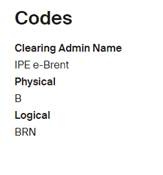
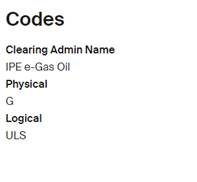
ICE uses the “contract code” to construct the symbols. This contract codes can either be the “Physical Code” or the “Logical code”. Customers will need to check with the exchange to confirm the contract code used in static data for the product.
Examples:
- Contract Code for Brent Crude Futures (https://www.theice.com/products/219/Brent-Crude-Futures ) uses the Logical Code BRN as contract code.
- Whereas Low-Sulphur-Gasoil-Futures (https://www.theice.com/products/34361119/Low-Sulphur-Gasoil-Futures) uses Physical Code G for contract code
Further details of ICE Instrument name convention can be found here:
https://www.theice.com/publicdocs/technology/Instrument_Naming_Convention.pdf
PartyIDs
| Expand | |||||||||||||||||||||||||||||||||||||||||||
|---|---|---|---|---|---|---|---|---|---|---|---|---|---|---|---|---|---|---|---|---|---|---|---|---|---|---|---|---|---|---|---|---|---|---|---|---|---|---|---|---|---|---|---|
|
Please refer to Whisperer Enterprise - PartyIDs for the full Enterprise table to view across all venues.
Regulatory Fields
| Expand | |||||||||||||||||||||||||||||||||||||||||||
|---|---|---|---|---|---|---|---|---|---|---|---|---|---|---|---|---|---|---|---|---|---|---|---|---|---|---|---|---|---|---|---|---|---|---|---|---|---|---|---|---|---|---|---|
|
Please refer to or to Regulatory Fields for the full Enterprise table to view across all venues.
Passthru Fields
| Expand | |||||||||||||||||||||||||||||||||||||||||||
|---|---|---|---|---|---|---|---|---|---|---|---|---|---|---|---|---|---|---|---|---|---|---|---|---|---|---|---|---|---|---|---|---|---|---|---|---|---|---|---|---|---|---|---|
|
Please refer to Passthru Fields for the full Enterprise table to view across all venues.
Details
Symbology
LME
The LME product contract code that represents metal or contract. The first 2 characters represent the Venue Product Code, The 3rd character represents the currency.
Example :
LME publishes Tradable Instrument File as per the documentation https://www.lme.com/-/media/Files/About/Regulation/Mifid-ii/Tradeable-Instrument-File-(TIF)-Specification-v1,-d-,11.pdf.
ICE
ICE Product Codes are available at https://www.theice.com/products - There is a CSV file that can be downloaded from this page by clicking the “Product codes” link in the top right corner.
ICE uses the “contract code” to construct the symbols. This contract codes can either be the “Physical Code” or the “Logical code”. Customers will need to check with the exchange to confirm the contract code used in static data for the product.
Examples:
- Contract Code for Brent Crude Futures (https://www.theice.com/products/219/Brent-Crude-Futures ) uses the Logical Code BRN as contract code.
- Whereas Low-Sulphur-Gasoil-Futures (https://www.theice.com/products/34361119/Low-Sulphur-Gasoil-Futures) uses Physical Code G for contract code
Further details of ICE Instrument name convention can be found here:
https://www.theice.com/publicdocs/technology/Instrument_Naming_Convention.pdf
Overview
Content Tools